Time Tracking Software Comparison Finding the Right Tool
Our time tracking software comparison helps you choose the right tool. We analyze features, pricing, and use cases for freelancers, agencies, and SaaS teams.
Picking the right time tracking software is about more than just logging hours; it's about choosing a strategic partner to boost your business's efficiency and profitability. This time tracking software comparison goes beyond a simple feature list. We’ll dig into which tool truly fits your main goal, whether that’s nailing accurate client billing, improving internal project management, or getting deep productivity insights.
Why Time Tracking Is a Strategic Business Tool
Forget the old punch-clock mentality. Today, time tracking is a core business asset, giving you the hard data needed for smarter decisions, especially with remote and hybrid teams. For founders, marketers, and makers, knowing where your time goes is the same as knowing where your money goes.
This is exactly why a detailed comparison is so important. The best tools don't just count hours—they reveal the true cost of a project, pinpoint where you’re stretched thin, and show you what’s actually making you money.
Unlocking Data for Growth
Without solid time data, you’re basically just guessing. You might feel like a project is profitable, but unless you're tracking every single billable and non-billable hour, you can't really be sure. This is where modern software becomes a game-changer.
- Accurate Project Costing: Know exactly how much labor goes into every project. This helps you set pricing that’s both sustainable and profitable.
- Informed Resource Allocation: See at a glance who’s overloaded and who has room for more work. This means smarter workload distribution and less burnout.
- Profitability Analysis: Pinpoint which clients or services bring in the most revenue for the time you put in, helping you shape your future strategy.
This data-first approach is why the market is booming. The time tracking software market is expected to grow at a compound annual rate between 13.38% and 17.26% over the next ten years, all thanks to the demand for better productivity insights and the new reality of remote work.
When you start seeing time tracking as a source of business intelligence, you help your team focus on high-value work that actually drives growth. It stops being about oversight and becomes a tool for optimization.
On top of that, the right system can have a huge impact on team morale. It's important to grasp the bigger picture here; good time management practices can directly improve team wellness. You can see how poor time management impacts employee well-being. When done right, time tracking builds transparency and helps keep workloads fair, which leads to a much healthier work environment for everyone.
How to Choose the Right Time Tracking Software
Diving into a time tracking software comparison without a clear plan is a bit like starting a road trip with no map. Before you get lost in a sea of feature lists and pricing tiers, you need to define what problem you're actually trying to solve. A solid framework from the get-go ensures you pick a tool that fixes your specific issues, not one that just adds more complexity.
The first step is always to nail down your primary goal. Are you an agency that absolutely needs bulletproof, detailed records for client billing? Or is your focus more on internal project management and getting a handle on where your team's time is really going? Maybe you're just looking for pure productivity insights to find and fix workflow bottlenecks. Each of these goals points to a very different kind of tool.
Defining Your Core Requirements
Answering a few key questions will help you build a personalized scorecard for your search. This simple exercise turns a vague hunt into a focused mission, making sure you evaluate every option against what actually matters to your business.
Start by thinking through these areas:
- Team Size and Scalability: Will this software grow with you? A tool that's perfect for a freelancer is going to fall apart when a 50-person team needs advanced permissions and department-level reporting.
- Required Detail Level: Do you just need a simple start/stop timer, or do you need something that automatically tracks activity, like app usage and websites visited? The difference in the data you get—and the level of team monitoring—is massive.
- Integration Needs: What tools are absolutely essential to your daily workflow? If a time tracker can't talk to your project management or accounting software, you're just signing up for more manual data entry. Connecting your tech stack is powerful, which we also cover in our guide to the best marketing automation software.
This decision tree gives you a visual for how different business needs, from project costing to profitability analysis, should steer your choice.
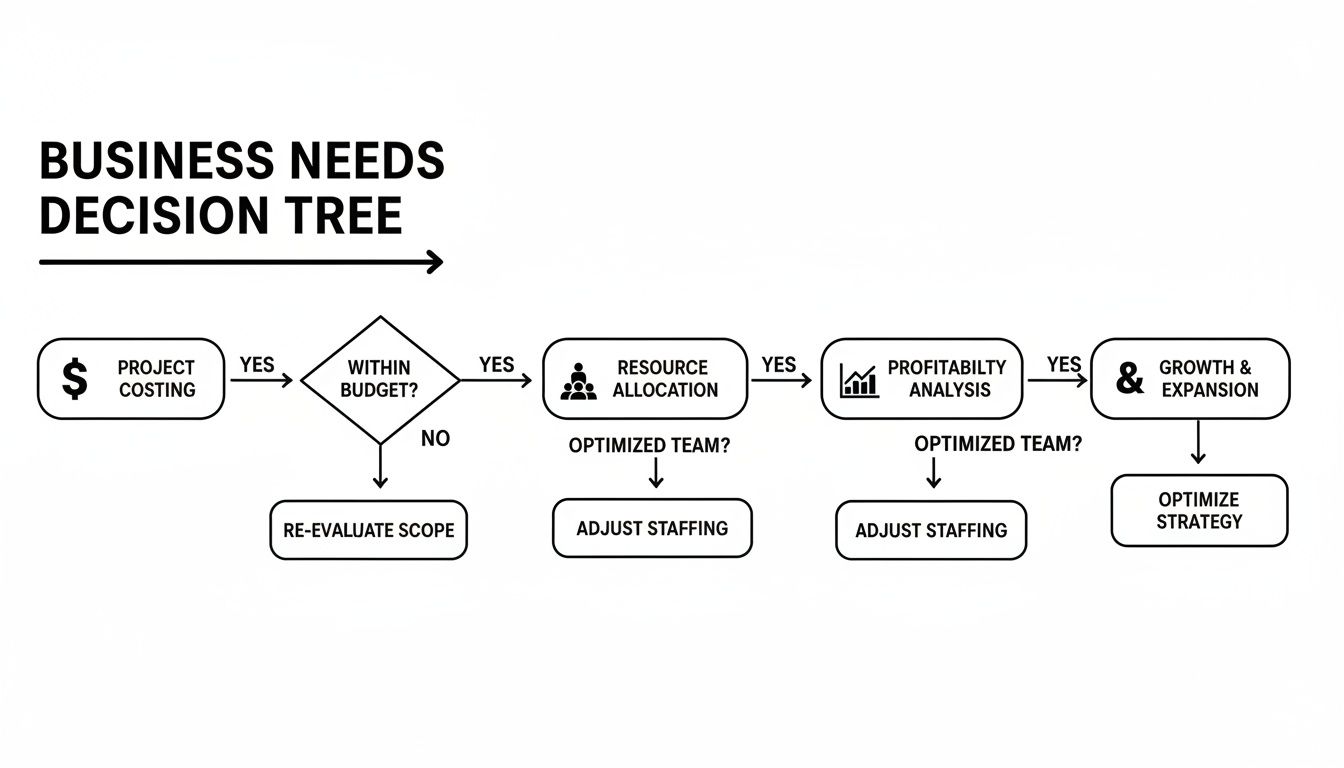
As you can see, the path to the right tool always starts with your core financial and operational drivers.
Creating Your Evaluation Scorecard
Once you have those answers, you can put together a simple scorecard to make your time tracking software comparison way more effective. Just list your must-have features and score each tool you're considering against them.
For instance, a creative agency's scorecard would probably prioritize things like:
- Client-Specific Reporting: Can it generate clean, professional reports that are ready to be attached to an invoice?
- Project Budget Tracking: Does it provide real-time alerts when a project is nearing its budgeted hours?
- Seamless Invoicing Integration: Does it connect directly to tools like QuickBooks or Xero to eliminate manual work?
By creating a scorecard before you start signing up for free trials, you won't get distracted by shiny features you'll never use. It keeps your evaluation grounded in what your business truly needs and leads to a much better fit in the long run.
This structured approach turns what could be a guessing game into a strategic decision. With your unique requirements clearly defined, you're ready to jump into a head-to-head comparison of the top contenders.
A Detailed Time Tracking Software Comparison
Alright, let's get to the heart of it. We're going to move past the glossy feature lists and dig into a real-world comparison of four of the biggest names in time tracking: Toggl Track, Harvest, Clockify, and Hubstaff. My goal here isn't just to show you what each tool can do, but to help you figure out who each one is truly for. Finding the right fit is all about matching a tool's philosophy to your team's actual workflow.
We'll break down each platform based on the stuff that actually matters—automation, project management muscle, reporting power, and team oversight features. This way, you can weigh your options based on what will genuinely make a difference for your business.
Toggl Track: The Simplicity Champion
Toggl Track has built its entire brand on being incredibly simple and almost invisible. Its greatest strength is a time-entry process so smooth it just melts into your workday, which is exactly what you want.
The whole system revolves around a one-click timer that works everywhere—desktop, web, and mobile. This focus on ease of use is a game-changer for team adoption. Let's be honest, if tracking time is a chore, your team just won't do it consistently. Toggl gets this better than anyone.
It also has some smart little tricks up its sleeve, like tracking reminders and idle detection, to gently nudge people toward better habits. For any team that's tried and failed to get time tracking to stick, Toggl's friendly, user-first approach can be the key.
Toggl Track's Differentiator: Its absolute dedication to simplicity and a fantastic user experience. It's the best pick for teams who value high adoption and ease of use over a massive feature set. This is a tool designed to be used, not just owned.
While it nails the basics, its project management tools are definitely on the lighter side. You get project dashboards and can track profitability, but you won't find the heavy-duty resource planning or complex budgeting that some of the other platforms offer.
Harvest: The Agency Powerhouse
Harvest is built from the ground up for businesses that run on billable hours. I'm talking about creative agencies, consultants, and any service provider who bills clients for their time. The entire platform is designed to turn tracked hours into cash with as few steps as possible.
It brilliantly connects time tracking with expense logging and invoicing. You can create polished, detailed invoices right from the hours your team has logged on a project. Then, you can send them off to clients and get paid through its Stripe and PayPal integrations.
This tight workflow is a massive win for anyone in operations. It kills the soul-crushing task of manually copying numbers from a spreadsheet to an invoice, which means you bill for every last minute and make fewer mistakes. If you're interested in other tools that can seriously streamline business ops, our email marketing software comparison is a great read.
Harvest's Differentiator: The seamless, best-in-class integration of time tracking, expenses, and invoicing. It is, without a doubt, the top choice for service-based businesses that need to convert hours directly into revenue.
Harvest also shines with its visual reports, especially for project budgets. You can see in a flash how your actual hours are stacking up against your estimates, which helps project managers get ahead of scope creep before it becomes a problem.
Clockify: The Freemium King
Clockify has absolutely dominated a corner of the market by offering a free plan that's almost too good to be true. For freelancers, small teams, or startups just dipping their toes into time tracking, it delivers a powerhouse of features without asking for a credit card.
Where most free tiers feel crippled, Clockify’s gives you unlimited users, unlimited projects, and unlimited tracking. This makes it a no-brainer for any team needing core functionality without a budget.
The interface is clean and gets right to the point. You can track time with a timer or fill out a timesheet manually. It also includes basic reporting and lets you tag time as billable—all the fundamentals are covered.
Clockify's Differentiator: The most generous and functional free plan you'll find anywhere. It's the default starting point for individuals and teams who need a robust, no-cost way to get a handle on their time.
Once you're ready to grow, Clockify’s paid plans unlock more serious business tools, such as:
- Time Off Tracking: Manage vacation, sick days, and holidays all in one place.
- Approval Workflows: Set up a review process for timesheets before they go to billing.
- Custom Fields: Add extra data to time entries for deeper analysis.
This "start free, scale up" approach makes it an incredibly flexible and smart financial choice for a growing business.
Hubstaff: The Remote Team Specialist
Hubstaff is built for a different world: managing remote, hybrid, and field teams where you need real visibility into what's happening. It goes way beyond a simple timer to offer a full suite of workforce management and employee monitoring features.
This is the tool for businesses that need more than just a clock. Hubstaff’s standout features include optional screen recording, tracking the apps and URLs people use, and monitoring activity levels based on keyboard and mouse movement. This data gets rolled up into productivity scores, giving managers a clear picture of how engaged their team is.
These features can be invaluable for companies that bill clients based on activity levels or need to prove compliance in regulated fields. For more on what's available in specific markets, this guide on the best time and attendance software for UK SMEs offers some great local insights.
Hubstaff's Differentiator: Its powerful employee monitoring and productivity metrics. It’s the go-to solution for remote or field-based companies that need to verify work, track activity, and effectively manage a distributed team.
Hubstaff also offers GPS tracking and geofencing for mobile teams, which can automatically start and stop the timer when someone arrives at or leaves a job site. This is perfect for industries like construction, logistics, and field services.
Feature Matrix of Leading Time Tracking Software
To make this even clearer, I've put together a table that lays out how these four tools compare on the features that matter most. This side-by-side view really highlights where each one shines.
| Feature | Toggl Track | Harvest | Clockify | Hubstaff |
|---|---|---|---|---|
| Core Time Tracking | Excellent (Simple, intuitive) | Excellent (Project-focused) | Excellent (Generous free plan) | Excellent (Multiple modes) |
| Automation | Good (Reminders, idle detect) | Good (Integrations) | Fair (Basic) | Best (Geofencing, activity) |
| Invoicing & Expenses | Basic (Via integrations) | Best (Native, seamless) | Good (Paid plans) | Good (Integrations, payroll) |
| Project Budgeting | Good (Profitability tracking) | Excellent (Visual alerts) | Good (Paid plans) | Good (Budget limits) |
| Employee Monitoring | None | None | None | Best (Screenshots, activity) |
| Reporting & Analytics | Good (Customizable) | Excellent (Client/Project focus) | Good (Improves with paid plans) | Excellent (Productivity focus) |
| Best For | Simplicity & Adoption | Agencies & Client Services | Startups & Budget-Conscious Teams | Remote & Field Teams |
This matrix really tells the story. If your company culture is built on trust and autonomy, something like Hubstaff might feel heavy-handed. On the flip side, if you're managing a large remote team and productivity is a top concern, Toggl Track might not give you the insights you need.
Understanding these differences is everything. For SaaS founders and marketers, it's also worth noting where these tools are most popular. North America currently represents the largest market share for time tracking software, but the Asia-Pacific region is the fastest-growing market thanks to a huge push in digital transformation. Picking a tool with a solid footing in your key region can be a smart move.
Which Time Tracking Software Actually Fits Your Business?
Let's be honest: a one-size-fits-all approach to time tracking just doesn't work. The "best" tool isn't the one with a million features; it's the one that solves your specific problems without adding a bunch of complexity you don't need. Your business model, how your team is structured, and what you’re trying to accomplish should be the driving forces behind your choice.
Too often, generic recommendations lead to software that nobody uses and a wasted subscription fee. That's why we're digging deeper than a simple feature list. This is about matching the right tool to your real-world scenario, whether you're a freelancer trying to get paid or a fast-growing SaaS company trying to stay on budget.
Best for Freelancers and Solopreneurs
When you're working for yourself, the line between tracking your time and sending an invoice is practically nonexistent. What you really need is simplicity, a price that makes sense, and a straight shot from logged hours to a paid bill. Forget complex employee monitoring or multi-level approvals—you need a tool that makes billing a breeze.
Harvest is a clear winner here. It was practically built for service providers, creating a seamless link between your time entries and professional invoices. You can track your time, log expenses, and whip up an invoice in just a few clicks. Plus, you can get paid directly through its Stripe or PayPal integrations.
Here’s how that looks in the real world: Imagine you’re a freelance graphic designer juggling three different client projects. With Harvest, you set up a unique project for each one. As you work, you track every billable minute with a simple timer and can even snap photos of receipts for project-related expenses. At the end of the month, generating an invoice automatically pulls in all those hours and costs. No more guesswork, just accurate billing and faster payments.
If you’re on a super tight budget, you can't go wrong with Clockify. Its free plan is incredibly generous, offering unlimited tracking for solo users. It's the perfect way to build solid time management habits without spending a dime.
Best for Agile SaaS Teams
SaaS teams basically live inside their project management tools—think Jira, Asana, or ClickUp. For them, a time tracker has to feel like a natural part of that ecosystem, not just another browser tab to keep open. The magic is in a deep, smooth integration that connects time data directly to tasks, sprints, and epics.
This is where Toggl Track really shines. Its browser extension integrates beautifully with over 100 popular tools, putting a start/stop timer right inside the interface you’re already using. This makes tracking time feel like part of the development process itself, rather than some tedious chore tacked on at the end of the day.
For agile teams, the real value of time tracking is about refining sprint planning and getting better at estimates. Toggl Track gives you the data to answer critical questions like, "How accurate were our story point estimates?" without derailing the team's momentum.
Its power is in its simplicity. By making time entry almost invisible, Toggl ensures developers and product managers—who are often allergic to anything that pulls them from their core work—actually use it. That means you get more accurate data, which leads to much better project forecasting.
Best for Client Service Agencies
Agencies run on tight margins and navigate complex client relationships every day. Success hinges on mastering project budgets, keeping an eye on profitability in real time, and delivering transparent reports. Your time tracking software needs to be a powerful financial and project management ally, not just a simple stopwatch.
Harvest comes through again, but it's the advanced budget tracking and reporting features that make it a perfect fit for agencies. You can set hourly or fee-based budgets for any project and get automatic alerts as you get close to your limits. This helps you spot scope creep before it eats into your profit margin.
Key features that agencies will love:
- Visual Budget Reporting: Dashboards give you an at-a-glance view of budgeted hours versus actuals, helping project managers keep everything on the rails.
- Team Capacity Planning: The Forecast feature gives you a clear picture of your team's schedule, making it way easier to allocate resources and plan for upcoming work.
- Detailed Invoicing: You can create invoices that show clients a crystal-clear breakdown of tasks and hours, which goes a long way in building trust.
Best for Remote and Hybrid Companies
When your team is spread out, you face a unique set of challenges. You need to ensure accountability and maintain productivity, but without making everyone feel like they're being watched over their shoulder. For remote-first companies, time tracking often needs to provide deeper insights into work patterns and activity levels. This is where tools with employee monitoring features can make a difference.
Hubstaff was designed specifically for this reality. It goes beyond a basic timer, offering optional screen recording, app and URL tracking, and activity monitoring based on keyboard and mouse usage. This data gives managers a better understanding of productivity trends and helps verify work for clients who are billed based on activity.
Hubstaff is also built for a mobile or field-based workforce. It has features like GPS tracking and geofencing that can automatically start or stop timers when an employee shows up at a job site. This makes it a fantastic choice for industries like construction, field services, and logistics where location-based tracking is crucial for accurate payroll and project costing.
3. Pricing, Security, and Getting Your Team On Board
When you're comparing time tracking software, it’s easy to get lost in feature lists. But the real make-or-break factors are often less flashy: the cost, the security protocols, and whether your team will actually use the thing. A tool with all the bells and whistles is useless if its pricing model drains your budget or if the implementation process tanks.
Let's dig into these three operational pillars. Getting these right means picking a tool that’s not just powerful on paper, but a practical, sustainable asset for your business.
Making Sense of Pricing Models
Time tracking software pricing can feel like a maze, but most tools stick to a few common structures. The trick is to look beyond the initial monthly fee and figure out the true total cost of ownership (TCO) as your team expands.
- Per-User, Per-Month: This is the industry standard. It’s simple to understand but can get pricey fast as you hire more people.
- Freemium Tiers: Tools like Clockify offer surprisingly powerful free versions, which are fantastic for small teams or startups. The catch? You need to check exactly which features—often critical ones like advanced reports—are behind the paywall.
- Flat-Rate Plans: A less common but highly appealing option. Some platforms charge one set price for unlimited users, making them a godsend for large or rapidly growing companies.
The global time tracking market valuation is a testament to this diversity, estimated between USD 5.23 billion and USD 7.13 billion in 2024. That huge range reflects everything from simple timers for freelancers to enterprise-level project management suites. You can find more market data over at imarcgroup.com.
Expert Insight: Your goal isn't just to find the cheapest option today. It's to find a plan with a predictable and affordable upgrade path. Don't get stuck in a pricing model that penalizes you for success.
Vetting Security and Compliance
For any modern business, data security is table stakes. When you’re evaluating a time tracking tool, you’re trusting it with sensitive company and client information. You absolutely must verify that it meets key compliance standards.
Look for vendors who are upfront about their security posture. Here are the big ones to ask about:
- SOC 2 Compliance: This is the gold standard for SaaS. A SOC 2 audit confirms a provider securely manages data to protect client privacy and interests.
- GDPR Compliance: If you do business in the EU or have clients there, this is non-negotiable. It ensures the platform adheres to Europe’s strict data privacy laws.
If you can't easily find this information on a vendor's security page, don't hesitate to ask their sales team directly. It's a red flag if they can't give you a straight answer.
The Human Side: Implementation and Team Buy-In
Let's be real: the best software in the world is worthless if your team hates using it. A successful rollout is all about communication and showing your employees what’s in it for them.
Frame the tool as a benefit—a way to ensure workloads are fair, project estimates are accurate, and administrative busywork is minimized. It's about transparency and efficiency, not surveillance. For a deeper dive, our guide on crafting effective SaaS pricing strategies has great insights into how to communicate a tool's value.
Start small with a pilot project. Pick a small, enthusiastic group and use their feedback to iron out the kinks before going company-wide. Then, provide solid training, create consistent project naming rules, and lead by example from the top down. This is how time tracking becomes a natural, helpful part of the daily workflow.
Common Questions About Time Tracking Software
Even after you've compared all the features and pricing, some practical questions always surface. Choosing the right tool is just the first step; getting your team to actually use it and weaving it into your daily operations is where the real work begins. Let's tackle some of the most common questions that pop up when you're in the final stages of picking and implementing a time tracker.
Getting these details right can be the difference between a successful rollout and another piece of shelfware.
How Do I Get My Team to Actually Use It?
Adoption is all about how you frame it. If you introduce a time tracker as a big-brother surveillance tool, you’ll get pushback. Instead, present it as a tool for the team's benefit—a way to create better project estimates, make sure no one is overloaded, and protect everyone's time. The conversation should be about project health, not just monitoring keystrokes.
A great way to start is with a small pilot group. Let them kick the tires, find any issues, and give honest feedback. From there, provide clear, simple training on how to log time correctly and—this is crucial—lead by example. When managers and team leads are diligently tracking their own time, it shows everyone it’s a shared responsibility.
The real key is to show people what’s in it for them. Think easier weekly reports, fewer "what are you working on?" check-ins from managers, and solid data to back up their accomplishments. Making the tool fit into their existing workflow, like an integration with Asana or Slack, is also a game-changer for reducing friction.
Can This Software Integrate with My Payroll Tools?
Absolutely. Most modern time tracking platforms are built to play well with others. The best-in-class tools, like Harvest and Hubstaff, offer seamless, one-click integrations with the big names in accounting and payroll—think QuickBooks, Xero, Stripe, and PayPal. This connection is what turns timesheets into invoices or paychecks automatically, saving you a ton of administrative headaches.
If you have a more unique setup or a custom-built system, many platforms also offer a well-documented API or connect through a service like Zapier. Before you commit to any tool, spend five minutes on their integrations page. Make sure it hooks up cleanly with the financial software you already rely on.
What's the Difference Between Active and Passive Time Tracking?
This is a really important distinction that gets to the heart of company culture and the kind of data you want to collect.
- Active Time Tracking: This is the manual approach. Users have to physically press a button to start and stop a timer for a task. It gives you incredibly accurate, user-approved data, but it all hinges on people remembering to do it. Tools like Toggl Track and Harvest are the champions of this method.
- Passive Time Tracking: This style is more "set it and forget it." Seen in tools like Hubstaff, it runs quietly in the background on an employee's computer, automatically logging activity in different apps and on websites. It captures everything without manual work, giving a complete picture of the day.
Which one is right for you? It really comes down to your team's dynamic. If you need ironclad, verifiable time logs for client billing, active tracking is your best bet. If your main goal is to get a broad overview of productivity patterns for a remote team, passive tracking can provide richer data, but you have to be mindful that it can feel more intrusive.
Is Free Time Tracking Software Good Enough for a Small Business?
For freelancers or a team of two or three with simple needs, a free plan from a tool like Clockify or Toggl can be a fantastic way to get started. These free tiers usually give you the basics: unlimited time entries, simple reports, and maybe an integration or two. They're perfect for getting into the habit of tracking time before you invest any money.
But you'll probably hit a ceiling. As soon as you need to manage project budgets, run more detailed reports, send invoices to clients, or set different permissions for team members, you'll find those features are almost always locked behind a paid plan.
Ready to find the next great tool for your startup? SubmitMySaas is a discovery platform where you can launch your product and connect with thousands of early adopters. Get featured, gain valuable backlinks, and kickstart your growth. Submit your SaaS today!