What Are Productivity Tools: The Ultimate Guide
What Are Productivity Tools. Explore what productivity tools are, their core benefits for teams, and how to choose the right stack for your workflow
Productivity tools are digital systems that reduce coordination and information-processing costs through automation, collaboration, searchable records, and analytics. In a field study of 5,172 customer-support agents, a generative-AI assistant increased issues resolved per hour by 15% on average, though the gains and quality effects varied by experience (field study details).
The popular advice is to keep adding apps until work feels organized. That advice is backwards. A productivity tool earns its place only when it removes a bottleneck, shortens a handoff, improves access to information, or prevents avoidable rework. Otherwise, it becomes another inbox, dashboard, notification stream, and subscription for someone to maintain.
That distinction matters most as a startup grows. A solo founder can keep context in their head, a notes app, and a few browser tabs. A team needs explicit owners, deadlines, dependencies, decisions, documentation, and reliable ways to find what happened. The transition from individual efficiency to coordinated execution explains what productivity tools really are, how they evolved, and why a smaller stack often outperforms a larger one.
Rethinking What Productivity Tools Actually Do
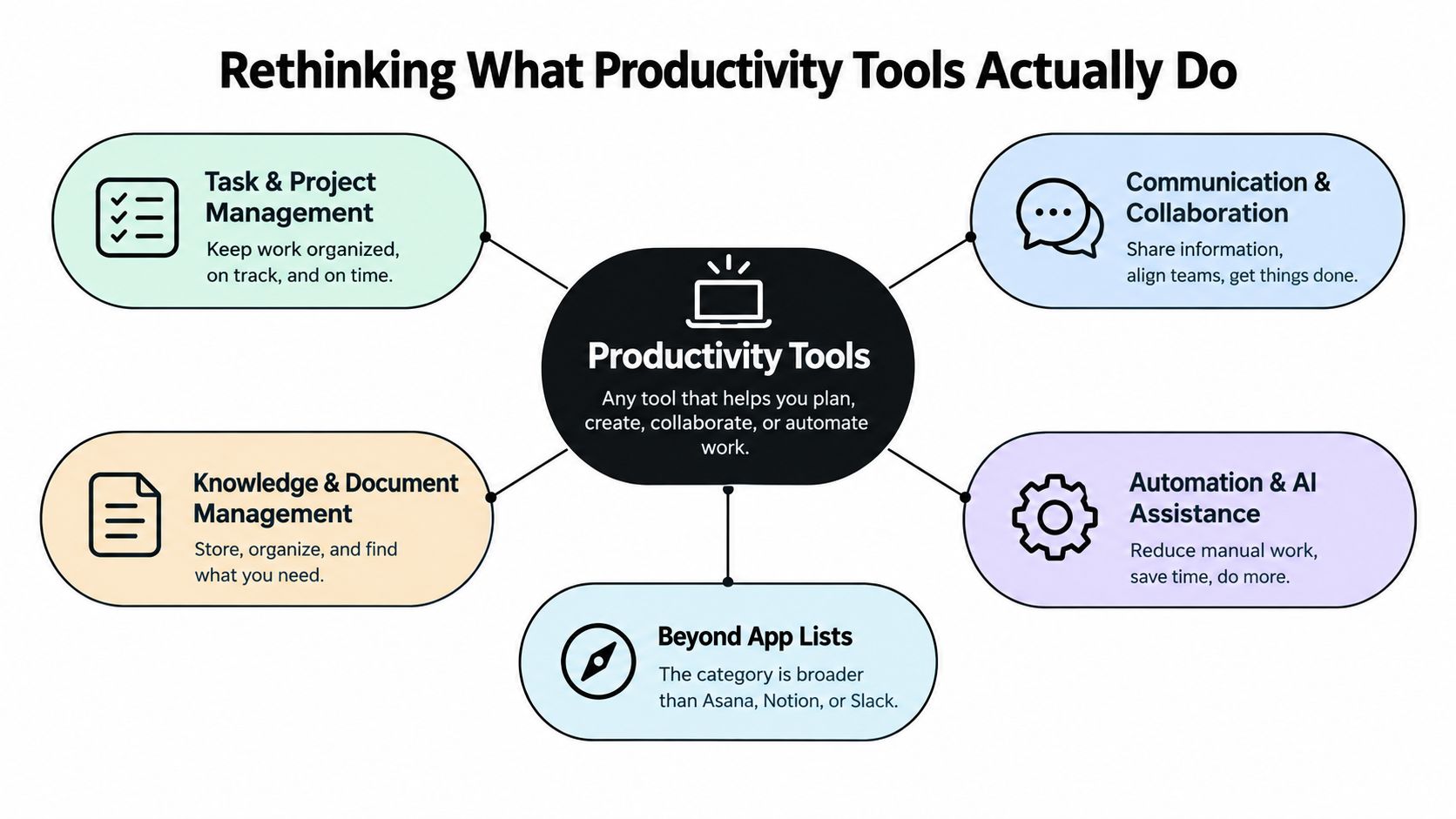
Many people asking what are productivity tools expect a list of familiar products such as Asana, Notion, or Slack. Those products fit the category, but the category is wider than a list of recognizable apps. A productivity tool is any digital system that helps people plan, create, organize, communicate, calculate, or automate work with less friction.
The practical definition is more useful than the marketing definition. Productivity tools manage workflow state, record information, expose relevant data, send signals, and connect systems. A task moves from unassigned to owned, scheduled, active, blocked, reviewed, and complete. The tool's value comes from making that movement visible and dependable.
The bottleneck matters more than the feature list
A task manager may help when work disappears after meetings. A knowledge base may help when employees repeatedly ask the same questions. Automation may help when someone copies the same information between a form, spreadsheet, CRM, and project board. Team chat may help with rapid decisions, but it can also bury important decisions if nobody records them where the work lives.
The technical value of these systems lies in lowering coordination and information-processing costs. OECD evidence links digital-skill use at work with positive, statistically significant firm-level labor-productivity growth, particularly in services and younger firms, while software investment produces especially strong benefits among lower-productivity firms (OECD firm-level evidence on digitalisation and productivity). The same evidence also points to complementary infrastructure and user capability, so software alone can't carry the result.
Practical rule: If you can't name the repeated delay, duplicated effort, or missing information a tool will remove, you haven't identified a reason to adopt it.
A useful stack might include project management, documentation, communication, scheduling, workflow automation, time tracking, or AI assistance. The right combination depends on where work slows down. For teams deciding how people and AI should share execution, this perspective also connects with human and AI collaboration, where the workflow matters more than the novelty of the assistant.
The Evolution from Desktop Apps to Cloud Ecosystems
Productivity software began as a way to help one person finish a familiar task faster. A word processor replaced typed pages, a spreadsheet automated calculations, and presentation software organized visual communication. These programs reduced manual effort, but each usually lived on one computer and served one primary activity.
Microsoft Office created a durable alternative. Microsoft introduced Office for Macintosh in 1989 and for Windows on November 19, 1990, combining Word, Excel, and PowerPoint in one package (history of the Office suite). Word originated in 1983, Excel launched for Macintosh in 1985, and Microsoft acquired PowerPoint in 1987. By 1988, Excel was reported to be outselling Lotus 1-2-3, showing how integrated, familiar software could displace fragmented or manual workflows.
The suite model did more than put three icons in one menu. It gave organizations a common interface, related file formats, and a standard way to teach digital work. Later office suites expanded into email, calendars, databases, notes, collaboration, and project management. The workplace began to treat productivity software as a routine operating layer rather than a specialist computing utility.
The browser changed the unit of work
By the mid-2000s, web-based tools allowed several people to work on shared documents and access files through a browser. The tool no longer belonged to one employee's desktop. It became a shared workspace with permissions, version history, comments, notifications, and simultaneous editing.
Microsoft Office 365, introduced in 2011, represented the shift to a cloud-based business suite (evolution of Microsoft Office). Updates, storage, identity management, and collaboration could be delivered continuously over the internet rather than through occasional desktop releases.
That history explains today's ecosystem. Suites provide a foundation, but startups often need specialized products for customer support, product development, design, analytics, or automation. Integration has become as important as the individual application because work crosses boundaries. A founder evaluating productivity apps on Mac should therefore look beyond the interface and ask whether the app fits the team's wider workflow, data, and collaboration habits.
Core Features That Define Modern Productivity Software
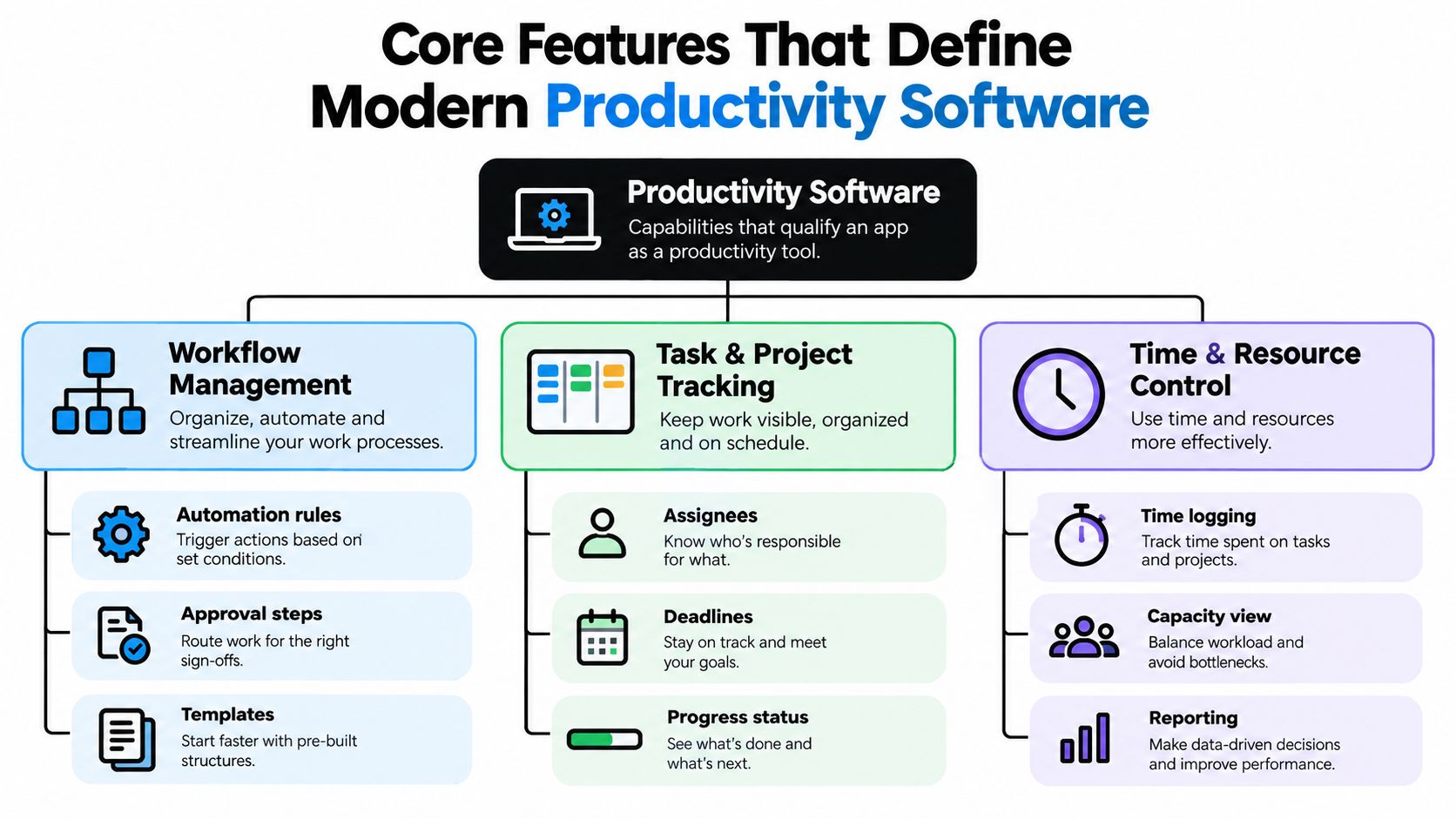
Modern productivity software isn't defined by whether it has a checklist or a calendar. It qualifies when its capabilities help a person or team move work through a repeatable process while preserving enough context for the next decision.
The core components usually work together:
- Workflow state management: Tasks have owners, statuses, deadlines, dependencies, and approval points.
- Searchable records: Documents, decisions, comments, and activity remain available after a meeting ends.
- Notifications and triggers: People receive relevant signals when work changes, rather than relying on memory or manual chasing.
- Integrations: Information can move between systems without repeated copying and pasting.
- Analytics: Leaders and operators can inspect cycle time, work-in-progress, delays, capacity, or rework.
State is the hidden foundation
A message saying “we're working on it” carries little operational value. A task with a named owner, due date, current status, dependency, and definition of done gives the team something they can act on. This is why task tracking and project management tools often outperform informal communication for delivery work.
A good system also makes handoffs explicit. If a designer completes a draft, the reviewer should know where to find it, what decision is needed, and what happens after approval. Searchable records prevent the same context from being reconstructed in another meeting.
Automation should remove steps, not add ceremony
Automation rules, templates, approval steps, and integrations can shorten routine workflows. For example, a form submission might create a task, assign it to the right owner, apply a project template, and notify the relevant channel. The automation is useful because it removes manual coordination, not because it creates an impressive configuration.
Time and resource features add another layer. Time logging, capacity views, and reporting can reveal whether work is aging, whether a handoff is delayed, or whether a team member is overloaded. But every field has a maintenance cost. Teams exploring AI workflow automation tools should test whether an automation improves the actual flow of work before expanding it.
A dashboard is only productive when someone uses its information to make a better decision.
Individual Efficiency Versus Team Collaboration
Personal productivity and team productivity solve different problems. A solo developer may need quick capture, focus protection, and a reliable way to sort commitments. A startup team needs shared ownership, decision visibility, dependencies, review flows, and a common source of truth.
The same product can serve both purposes, but the success criteria change. A personal notes app succeeds when it helps one person retrieve an idea. A shared knowledge base succeeds when another person can answer a question without interrupting the original author.
| Situation | Primary bottleneck | Useful capability | Common failure |
|---|---|---|---|
| Solo work | Distraction or forgotten commitments | Capture, prioritization, focus blocks | Overbuilding a personal system |
| Small team delivery | Unclear ownership | Assignees, deadlines, status, dependencies | Treating chat as the project plan |
| Distributed collaboration | Missing context | Async updates, searchable decisions, documentation | Creating notifications without norms |
| Cross-functional execution | Handoffs and rework | Approvals, integrations, shared records | Duplicating the same data in several tools |
Personal tools optimize attention
An individual task manager, calendar, timer, or writing environment can protect concentration. The best setup usually has a short path from capture to action. If recording a task requires navigating several fields, the system may discourage use at the exact moment it should reduce friction.
Personal workflows also tolerate ambiguity. You can leave a note with shorthand because you understand your own context. That shortcut becomes risky when another person must interpret the same record later.
Team tools optimize alignment
Teams need explicit conventions. Decide where a request becomes a task, where decisions are recorded, which channel handles urgent issues, and when an update is considered complete. Without those rules, adding software can increase the number of places people must check.
Async communication works when the message includes enough context for the recipient to respond without a meeting. A useful async communication tool should support deliberate updates, searchable history, and clear escalation rather than merely replacing meetings with more messages.
The most important selection question is simple: is the bottleneck inside one person's attention or between people's responsibilities? Choose a focus-oriented tool for the first problem and a coordination-oriented system for the second. Don't ask a personal to-do list to manage complex dependencies, and don't force a team into an elaborate platform when the core issue is one person's overloaded inbox.
AI and Tool Adoption: What the Evidence Actually Shows
AI can raise a tool's output without raising a team's productivity. The distinction depends on whether the capability fits the work, whether people can use it safely, and whether review, correction, training, switching, and compliance consume the apparent gain.
Adoption data shows why feature claims need context. Work-related generative-AI adoption rose from 33.3% to 37.4% in one year, while reported AI use increased from 4.1% to 5.7% of total work hours. Across all workers, the estimated time saving equated to only 1.6% of work hours, despite a potential labor-productivity gain of up to 1.3% (St. Louis Fed analysis of generative-AI adoption). Access and potential are different from realized value.
Feature productivity is not realized productivity
A tool that drafts text, summarizes meetings, classifies requests, or suggests replies delivers feature productivity. Realized productivity appears when the team completes valuable work faster or more reliably after accounting for the work required around that feature.
That surrounding work can include checking a summary, correcting an inaccurate draft, documenting an approval, switching between systems, or maintaining an integration. A faster first step can still create a slower end-to-end process if the output increases rework or weakens accountability.
Measure the result at workflow level:
- Throughput: Resolutions, deliverables, or decisions completed.
- Quality: Error rates, escalations, rework, and customer satisfaction.
- Human review: How often people correct or approve machine output.
- Workflow cost: New steps, interruptions, training, and integration maintenance.
Access determines who benefits
A simple interface does not make a tool equally usable across roles. Global research found that 54% of workers had used AI for their jobs in the previous year, while only 14% used generative AI daily. Daily use was 19% among office employees and 5% among manual workers (PwC Hopes and Fears research). The same source reports regular AI use among frontline employees at 51%, compared with more than three-quarters of leaders and managers.
Those differences turn training, mobile access, low-bandwidth support, language availability, privacy, data residency, and role-specific workflows into operating requirements. A team may adopt a capable assistant and still see little benefit if frontline staff cannot access it, trust its output, or fit it into the existing process.
Review AI productivity tools by asking what bottleneck each one removes and what new work it introduces. The right measure is not how many features a product offers, but whether the workflow becomes faster, clearer, and more dependable.
How to Choose the Right Tools for Your Workflow
Start with the bottleneck, not the category page. A team that can't find decisions needs a knowledge and documentation solution. A team that misses handoffs needs ownership and workflow state. A team drowning in repetitive entry may need automation. A team with overloaded specialists may need capacity visibility.

Use a small evaluation loop
- Describe the failure: Write down where work stalls, disappears, gets duplicated, or waits for approval.
- Map the current path: Follow one representative request from intake to completion, including every handoff and system change.
- Estimate the friction qualitatively: Note switching, searching, waiting, rework, interruptions, and manual updates.
- Choose one workflow: Pilot the tool on a contained process instead of asking the whole company to change at once.
- Define outcome measures: Track cycle time, work-in-progress age, handoff delays, search time, rework, quality, and adoption by role.
- Review the operating cost: Include training, administration, integrations, permissions, privacy, and the effort required to keep data current.
A demo should answer operational questions. Can an owner update status quickly? Can a new teammate find the latest decision? Can an approval happen without copying the same file into another system? Can the tool expose blocked work without creating a meeting to explain the dashboard?
Teams using Apple hardware can also compare macOS productivity apps as part of an environment check, but operating-system fit is only one criterion. The stronger test is whether the product fits the team's existing habits and systems.
Check these adoption risks before committing:
- Accessibility: Can every relevant role use it on the devices and connections available to them?
- Integration quality: Does data move reliably, or will staff maintain duplicate records?
- Privacy and governance: Are permissions, retention, and data-handling expectations clear?
- Information architecture: Can people find work without memorizing a complicated hierarchy?
- Exit cost: Can you export useful records if the tool no longer fits?
- Ownership: Who maintains templates, automations, fields, and access?
Use the following video as a practical prompt while reviewing your workflow and deciding which friction deserves attention first.
A smaller standardized stack often wins because people know where work belongs. Don't consolidate merely to reduce the number of logos. Consolidate when shared context, fewer handoffs, and lower maintenance make execution easier.
Conclusion - Building a Practical Productivity Stack
Productivity tools are best understood as workflow infrastructure. They store tasks and documents, but their deeper function is to make responsibility, context, timing, and progress visible to the people who need them.
The category evolved from standalone desktop applications to integrated suites and then cloud ecosystems. That history explains why modern tools combine planning, communication, knowledge, automation, analytics, and AI assistance. It also explains why no single feature determines success. A beautiful board doesn't repair unclear ownership, and an AI assistant doesn't repair a process that nobody has defined.
Choose adoption depth over feature breadth
A practical stack usually has a clear home for each type of work:
- Execution: Projects, tasks, owners, deadlines, and dependencies.
- Knowledge: Decisions, documentation, procedures, and reference material.
- Communication: Fast discussion with rules for escalation and durable recording.
- Automation: Repetitive transitions that remove manual effort.
- Measurement: A small set of outcomes connected to business value and quality.
Start with one painful workflow. Establish the team's rules, train the people who use the system, and measure whether work moves with fewer delays and less rework. Only then should you add another tool.
The productivity paradox is straightforward. More software can create more coordination cost when every product introduces its own notifications, records, permissions, and habits. The best stack isn't the one with the most capabilities. It's the one people use consistently because it makes the next action obvious.
If you're building or launching a SaaS product that solves a real workflow problem, SubmitMySaas offers a discovery platform for modern SaaS, AI, productivity, marketing, and design tools. Submit your product for consideration in its launch and discovery ecosystem, or browse the Productivity category to find tools that match a specific bottleneck.