By Outrank
How to Improve Website Speed for SaaS Teams
How to improve website speed with field Core Web Vitals, a fix order for LCP and INP, plus caching, CDN, and JavaScript budgets for SaaS sites.

On this page
Chasing a perfect Lighthouse score is the most popular way to waste a sprint. You can compress every image, watch the lab grade turn green, and still lose signups because a pricing toggle, search filter, or submit button doesn't respond when a real visitor taps it on a mid-tier phone.
That's the trap in most advice on how to improve website speed. It treats speed as a first-load screenshot instead of what your buyer feels on the path to signup. Measure real users on mobile, fix problems in dependency order, and govern the result with a budget per page type. Everything else is decoration.
Speed Targets That Protect Signups
A page can look loaded while the work that earns money is still stuck. JavaScript parks itself on the main thread, the visitor taps a filter or a Get started button, and nothing happens for a beat long enough to feel broken. Your targets have to catch that, not just celebrate a fast first paint.
The commercial cost is real. Google's guidance for small businesses on fast mobile sites reports that, in retail, a 1-second delay in mobile load time can reduce conversions by up to 20%, and it cites consumer research in which 62% of users who had a negative mobile experience were less likely to purchase from the same brand in the future. SaaS isn't retail, but the mechanism is identical. You pay for the click, the visitor waits, and the return on that traffic drops before your product gets a chance.
Judge the 75th percentile, not your best run
Score yourself at the 75th percentile of real mobile users. That means three quarters of visitors experience that number or better, and the slowest quarter, the people most likely to abandon a demo or form, stays visible instead of being averaged away.
Field targets for a fast product site
| Metric | Good | Usual lever |
|---|---|---|
| Largest Contentful Paint | 2.5 seconds or less (poor above 4.0 seconds) | Hero image, font, render-blocking CSS, TTFB |
| Interaction to Next Paint | Under 200 milliseconds (poor above 500 milliseconds) | Long tasks and third-party JavaScript |
| Cumulative Layout Shift | Under 0.1 (poor above 0.25) | Fixed size for images, embeds, and ad slots |
| Time to First Byte | 0.8 seconds or less (poor above 1.8 seconds) | Origin, cache, and CDN |
Read the lever column carefully because it tells you these are four different jobs. LCP is usually a hero media and blocking CSS problem. INP is a main-thread problem, and no amount of image work fixes a script that monopolizes the browser during a click. CLS is a layout discipline problem. TTFB is a server and delivery problem that delays everything downstream.
Score templates separately
Don't produce one sitewide number. For a SaaS or directory site, I would score three templates separately on mobile:
- Homepage: where paid and organic traffic lands first.
- Product or pricing page: where comparison and toggles drive the decision.
- Signup or submit path: where a slow click directly costs a conversion.
If you care how those numbers translate into completions, pair this work with a systematic look at improving website conversion rates so speed and signup rate sit on the same dashboard.
Before you change a single file, write today's mobile p75 beside each row of the table for each template. That sheet becomes your before picture, and it stops the team arguing from whichever lab run flattered them most.
A green lab run on office broadband proves your page can be fast. It doesn't prove your buyers experienced it that way.
How to Baseline Speed With Field Data
You can finish a useful baseline in one afternoon. The rule is simple, field data decides what's broken, and lab tools only explain why.
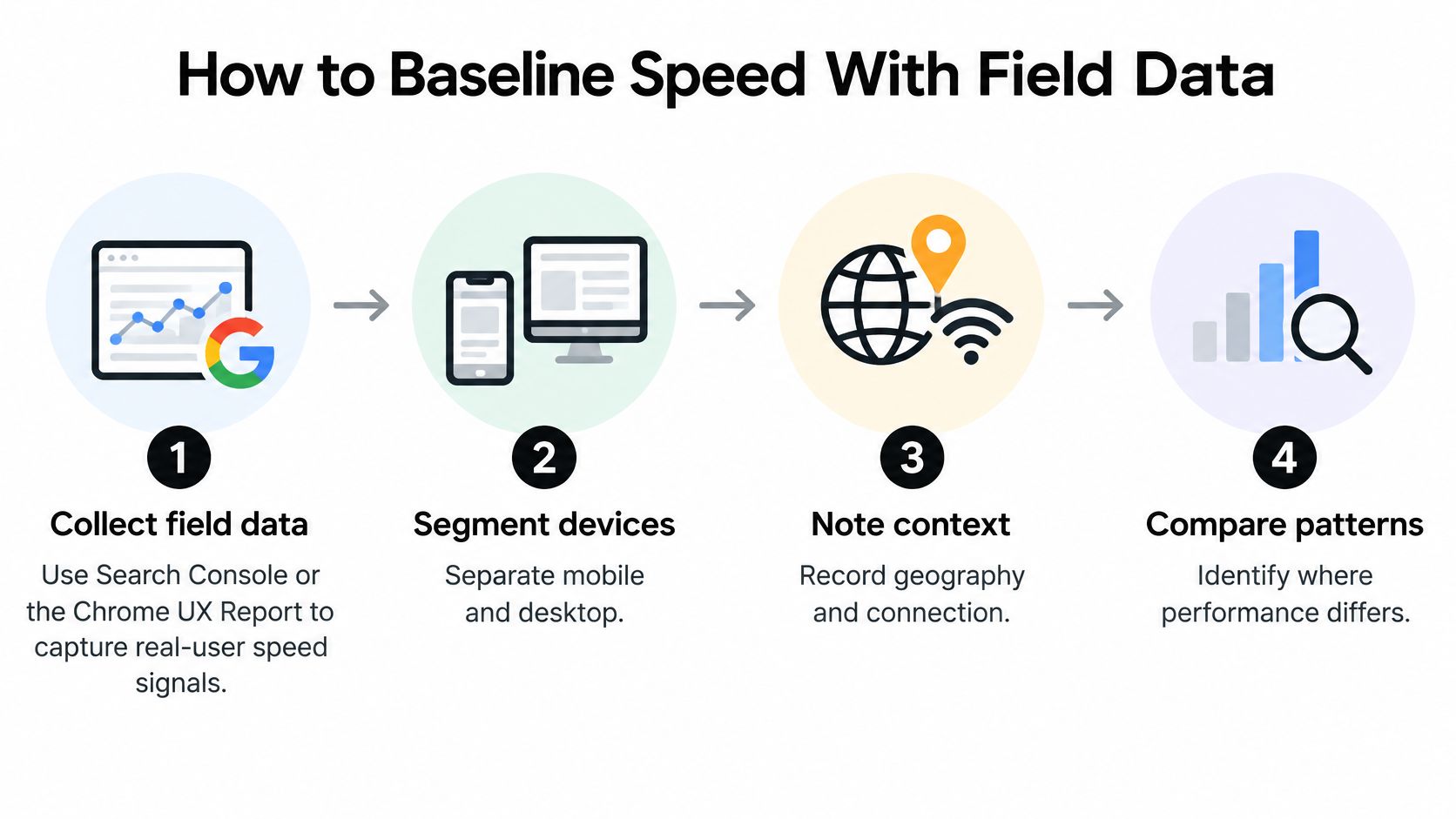
A six step routine
- Segment real users first: In Search Console or the Chrome UX Report, split mobile and desktop, and note geography and connection type where the tool allows it. Mobile is your primary view because that's where bandwidth and CPU constraints bite.
- Pull p75 by template: Record LCP, INP, and CLS for each key template, not a sitewide average. For a launch or directory product, split the homepage, product detail pages, search and filter pages, the submission or signup flow, and any page carrying analytics or sponsor widgets.
- Add TTFB on the same URLs: Use field or real-user monitoring data so server delay is judged on exactly the pages you're scoring.
- Run one lab pass for diagnosis: Use Lighthouse or WebPageTest on a mid-tier phone profile to name the LCP element, spot render-blocking CSS, and find long tasks. That's the lab's job, finding culprits, not declaring victory.
- Capture payload facts: Note transferred bytes, JavaScript size, and third-party share per template so later fixes have a before column.
- Save it keyed by template and release: One short sheet, one row per template, updated per deployment.
The thresholds you're judging against are the ones in Google's Core Web Vitals report documentation, which uses Largest Contentful Paint at or below 2.5 seconds, Interaction to Next Paint below 200 milliseconds, and Cumulative Layout Shift below 0.1 as the good bands. Any p75 above those lines is unresolved, no matter how close it feels.
Why averages hide the problem
An average blends your fast desktop repeat visitors with a first-time mobile visitor on a weak connection. The second person is the one who bounces. Reporting p75 forces you to look at that slower, revenue-risking quarter rather than the comfortable middle.
Two traps catch small teams repeatedly:
- Lab success, field failure: One improved Lighthouse run can leave real users sitting in needs improvement for weeks, because field data reflects devices and networks your test never simulated.
- Trading CLS for INP: Stabilizing layout by hydrating more JavaScript can make interactions slower, so you fix the metric you were staring at and damage the one tied to the signup click.
Practical rule: the baseline is done when every template has a mobile p75 and a named LCP element, and every value outside the good band is marked unresolved.
Keep notes next to the work
When you review findings with designers or stakeholders, keep comments attached to the exact element you flagged rather than in a separate thread that loses context. If your team reviews live pages together, it's worth learning how to pin comments on webpages so a note about a shifting hero or a laggy button stays where the problem is.
For ongoing monitoring after the baseline, you'll need proper observability tooling, and a comparison of Datadog and Grafana can help you decide where your real-user data should live long term.
The Fix Order for LCP INP and TTFB
Work in dependency order. Polishing the hero while the origin is slow is wasted effort, because every later metric waits on the first byte.
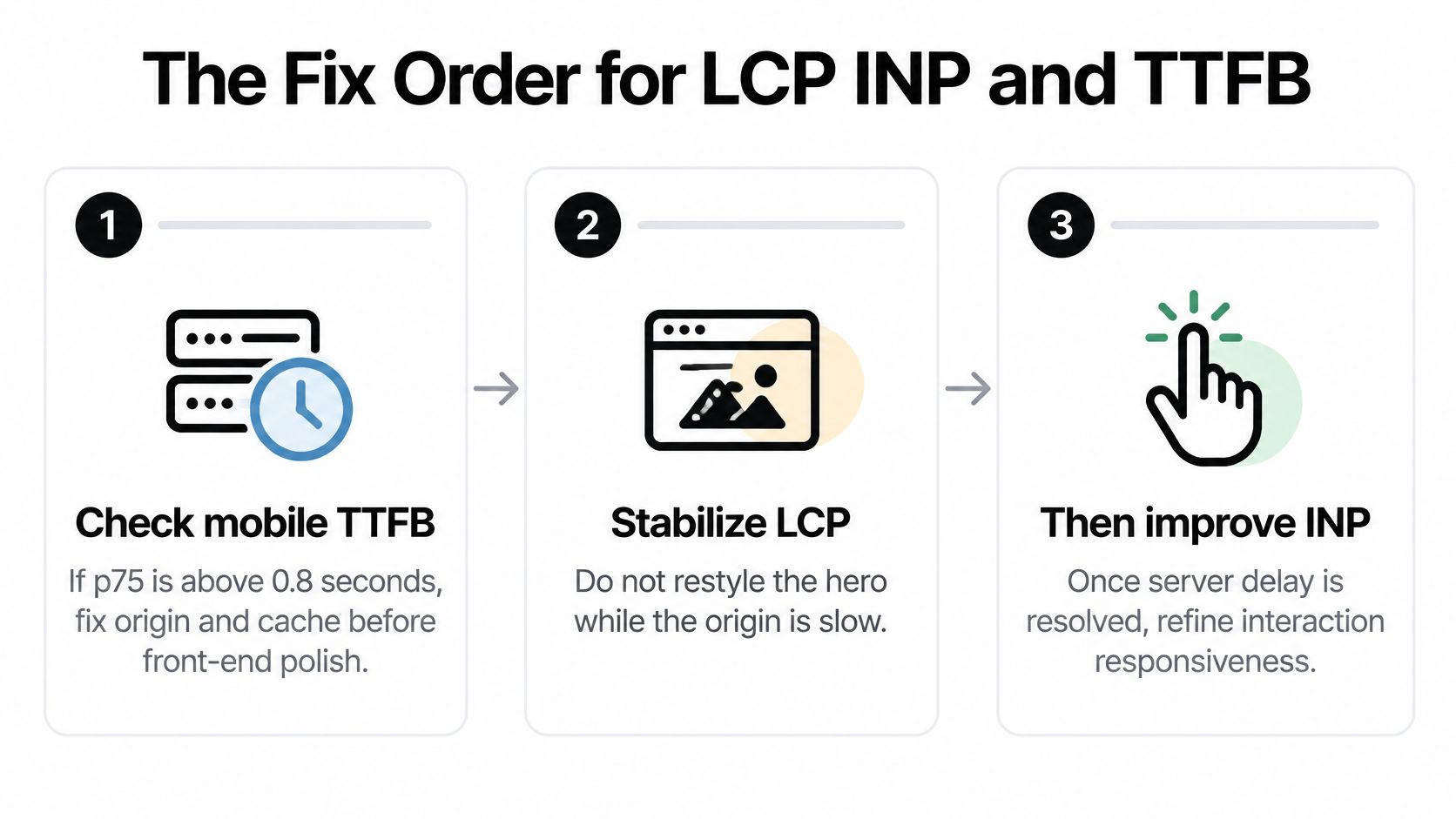
The six steps in order
- Fix TTFB first if it's out of band: If mobile TTFB p75 is above 0.8 seconds, stop and work on origin and cache before any front-end polish. Nothing renders, and nothing responds, until the browser gets that first byte.
- Name and prioritize the LCP element: Identify it on each template and preload only that image or font, with fetch priority set high. Don't preload below-the-fold media, because every extra preload competes with the asset that matters.
- Trim render-blocking CSS: Inline the small amount of CSS needed for first paint, defer the rest, and drop font files and weights you don't use. An unused font variant is pure delay.
- Reserve space to hold layout still: Set explicit width and height, or aspect-ratio, on images, video, and sponsor or ad slots. Content that jumps as late assets arrive is what pushes layout shift out of band.
- Profile the clicks that earn signups: Look for long tasks on the menu, search, filters, pricing toggle, and signup form. Split code by route and defer chat, analytics, and recommendation widgets until after the first interaction or during idle time.
- Verify in the field: Ship behind a controlled release and compare the same templates' mobile p75. A fresh lab screenshot isn't evidence of anything.
Why desktop passing proves nothing
Say a product listing ships a neatly compressed screenshot as its hero. The page paints fast and the lab score looks healthy. Then a visitor taps a filter, the click waits on a long main-thread task, and the listing feels broken even though it looked finished. Removing one large image raised the score and did nothing for the interaction the visitor came for.
That gap shows up at scale. The Web Almanac's 2025 performance analysis, based on Chrome UX Report data from millions of real-world page loads, found that 77% of mobile experiences achieved a good Interaction to Next Paint score, compared with 97% on desktop. A desktop pass tells you almost nothing about the phone in your buyer's hand, which has a slower CPU and feels every long task more sharply.
The question isn't how quickly the homepage renders. It's whether a visitor can use the discovery and signup path immediately, on an average mobile connection.
I would stop this pass when mobile p75 sits inside the good band on the templates that earn signups. Cosmetic refactors and framework debates can wait for a later sprint. The deeper bundle splitting and widget deferral work has its own audit method, so treat step five here as the triage, not the full treatment.
Tune Caching CDN and Server Response
When TTFB is out of band, you're usually looking at a hosting and caching problem that image work can't hide. The browser can't render faster than your server answers.
The first check is whether you're even serving cached responses to repeat and anonymous visitors, as this opening view of cache metrics suggests.

Separate public pages from the app
Start by splitting rules by route type, because they have opposite needs:
- Public marketing and listing pages: HTML is usually cacheable, at least briefly, and these pages carry your acquisition traffic.
- Logged-in shells and personalized dashboards: HTML generally isn't cacheable at a shared edge, and caching it there risks serving one user's content to another.
Put a long cache on hashed static assets, CSS, JavaScript, fonts, and images, since their filenames change when content changes. Put a short or revalidated cache on HTML. Send Cache-Control headers with explicit max-age values rather than relying on defaults you haven't read.
Put the edge near your buyers
Turn on a CDN with points of presence close to the countries that sign up, not just the country your server happens to sit in. Confirm it works by requesting a public URL twice and checking that the second response is an edge hit. Enable HTTP/2 or HTTP/3, keep-alive, and Brotli compression for text responses while you're in the delivery settings.
Then look at the origin itself. On listing and search templates, hunt for slow database queries, missing indexes, and server rendering that waits on third-party calls before it can return HTML. You don't need to server render every widget. For many product sites, static or cached HTML for the launch page with client-side work only for filters that need it is the faster and simpler shape.
A concrete case makes this tangible. Say a directory homepage rebuilds on every request because a sponsor widget calls an external API during rendering. Cache the page shell for a minute and load the widget after paint. The visitor gets the page immediately, the sponsor still appears, and one slow external dependency stops taxing every single visit.
The short walkthrough below covers the server response checks in practice, which is useful before you start changing cache headers.
Don't migrate platforms as a first move
A platform migration is often the wrong first response to slow TTFB. Plugin and theme bloat, a cold cache, and an origin in the wrong region explain far more slow first bytes than the name of the CMS does, and all three are cheaper to fix than a rebuild.
You're done with this layer when a repeat view of a public URL shows an edge hit and mobile TTFB p75 is back inside 0.8 seconds.
Shrink JavaScript and Hero Images
Start from an audit, not from a minify button. On a representative phone, record transferred bytes, compressed and uncompressed size, parse and evaluation time, long tasks, third-party share, and code coverage. Those six numbers tell you whether your problem is download weight, execution cost, or both.
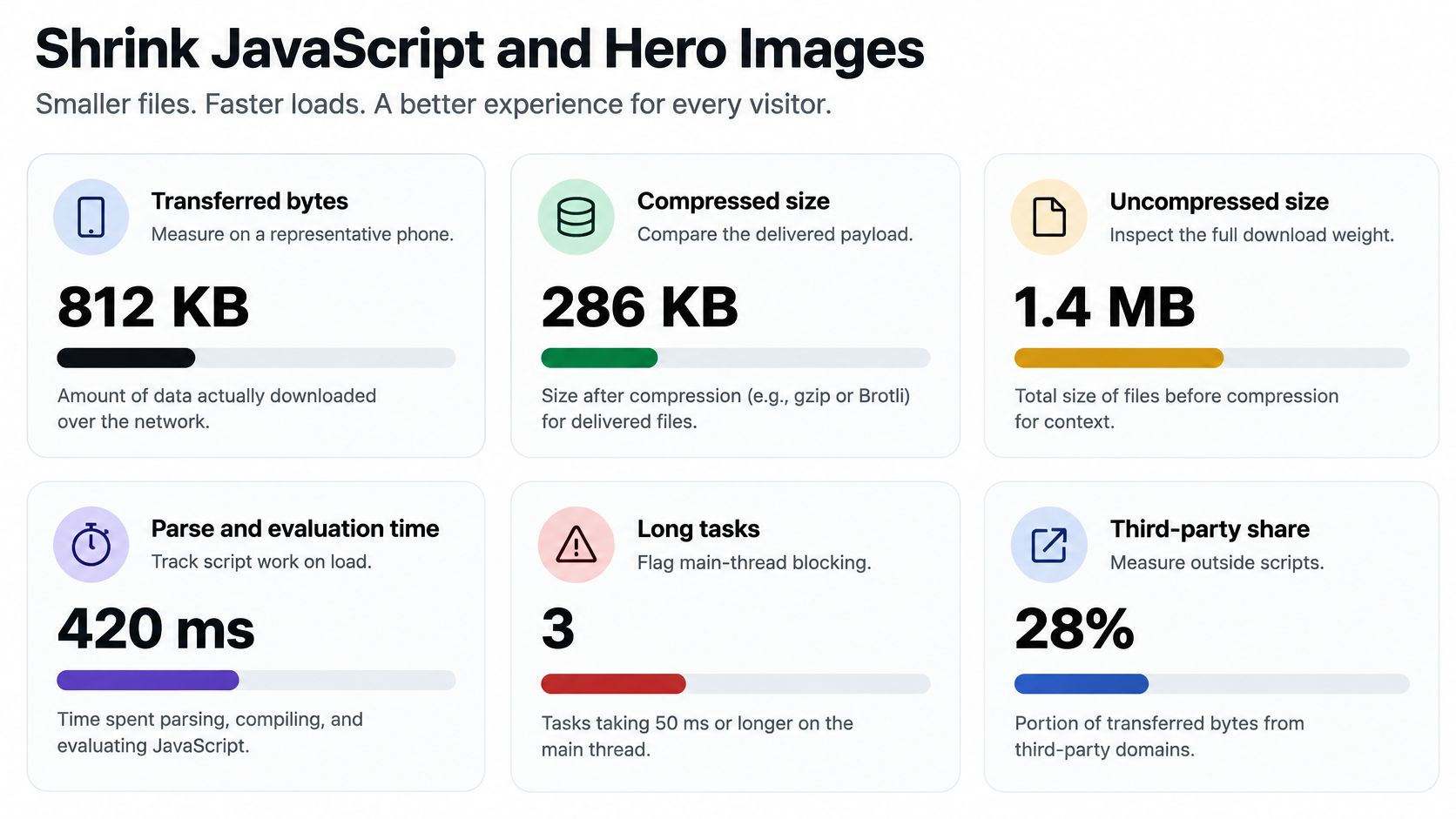
For scale, the HTTP Archive's 2024 JavaScript analysis puts the 2024 median JavaScript payload at approximately 558 KB on mobile and 613 KB on desktop, with about 206 KB, 44% of delivered mobile JavaScript, unused during page load. Treat those medians as a ceiling to beat, not a target to copy. Shipping code that never runs on the page is the single most common waste on product sites.
The six cuts that matter
- Remove unused packages and tree-shake exports: If a library contributes one utility, import the utility, not the library, and delete dependencies nothing references.
- Split bundles by route: A pricing page shouldn't ship every product-card interaction, and a blog post shouldn't ship the signup wizard.
- Defer below-the-fold UI: Carousels, testimonial sliders, and footer widgets can load when they approach the viewport, not at first paint.
- Load third parties only when needed: Analytics, chat, embeds, and recommendation widgets should wait until they're needed, or load after the main content is usable.
- Serve responsive hero images: Use AVIF or WebP where supported, size images for the slot they fill, set explicit dimensions, and don't lazy-load the LCP image, because lazy loading the hero delays the very thing you're measuring.
- Negotiate Brotli and vary the cache correctly: The same HTTP Archive dataset reports Brotli on roughly 45% of mobile and 44% of desktop JavaScript requests, compared with gzip at 41%, so enabling it where compatible is well-trodden ground.
Enforce it in CI
Set a device-specific JavaScript budget per route and fail the build when a route or a third party crosses it. A budget that only lives in a wiki page loses to the next feature deadline. A failing build doesn't.
Three moves waste releases consistently:
- Compressing an oversized bundle: Smaller syntax still parses and executes, and execution is often the cost on a phone.
- Shipping one global interaction bundle: Every page pays for every other page's features.
- Calling minification the strategy: It's hygiene, not a plan. The gain comes from code that never runs on that page at all.
Close the loop with a before-and-after row in your baseline sheet, JavaScript kilobytes, unused percentage, LCP element bytes, and INP on the signup click. If those four numbers moved together, the cut worked. If only the bundle size moved, you've probably just squeezed dead code into a smaller shape.
Set a Performance Budget You Can Keep
A budget turns one good cleanup into a property of every release. Write it down quarterly, per page type, because a launch page and a logged-in app shouldn't carry the same allowances.
Quarterly speed budget by page type
| Page type | Mobile transfer cap | JavaScript cap | Field gate at p75 |
|---|---|---|---|
| Marketing or launch page | About 1.5 MB | About 300 KB | LCP 2.5s or less, INP under 200ms, CLS under 0.1 |
| Directory or listing | About 2.0 MB | 400 KB | Same Core Web Vitals bands on mobile |
| Logged-in app shell | Route-split, no single global bundle | About 200 KB initial | INP under 200ms on the main task |
Those caps are deliberately tighter than typical pages. The Web Almanac's 2025 page weight analysis found the median homepage in 2025 weighed 2.9 MB on desktop and 2.6 MB on mobile, and that even among pages weighing 2 to 3 MB, only 53% of mobile pages passed Core Web Vitals. Weight alone doesn't pass, which is why every row needs the field gate beside the byte cap.
Make the budget survive the next sprint
- Compare p75 by template after every release: regressions tied to a specific deployment get fixed while the diff is still small.
- Test on a slow mobile profile: throttled conditions surface problems your office connection hides.
- Fail CI on JavaScript cap breaches: the gate has to be automatic or it will be negotiated away.
- Keep a third-party inventory with an owner and a reason: any tag that no longer has either gets deleted.
- Ignore lab gains that leave field INP unchanged: they aren't gains your users received.
CMS brand is a weak excuse for missing these numbers. The same 2025 analysis reports only about 45% of WordPress mobile sites met the overall Core Web Vitals benchmark, while Wix improved from 55% to 74%, which points at themes, plugins, hosting, and implementation rather than the logo on the platform. Rebuild only after plugin bloat, caching, and embed control have been tried and measured. Budgets also support solid technical SEO for SaaS sites, since the pages you want ranked are the same public templates you're capping.
You leave this step with three numbers per template written down for the quarter, a transfer cap, a JavaScript cap, and a field gate.
Ship One Speed Win This Week
Pick one template that earns signups and one metric still outside the good band. That's the whole decision, and keeping it narrow is what gets it shipped.
If TTFB is the outlier, ship cache and CDN rules for that public URL. If LCP is the outlier, preload only the LCP image and stop lazy-loading it. If INP is the outlier, defer one third-party script and split the route that owns the slow click.
Re-measure mobile p75 on that template after the release and keep the change only if the number moved. Keep the backlog in fix order rather than as a grab bag of image plugins, and watch signup completion beside the new p75 so you can see whether the win paid.
Once the page holds its budget, it's ready for paid or community traffic without paying for visitors who bounce on arrival. At that point discovery becomes the bottleneck instead, and SubmitMySaas lets makers submit their product launch for visibility, feedback, and a high-authority backlink. That step belongs after the page is fast, not before. One template, one metric, one release this week.
Now that your launch page loads fast and responds instantly on mobile, give it the audience it deserves through SubmitMySaas, where you can submit your product launch for visibility, early feedback, and a high-authority backlink. Visit the site today, submit your project in a few minutes, and turn the speed work you just did into users who reach your signup form.