By Outrank
Domain vs Subdomain: Which Structure Fits Your Site
Compare domain vs subdomain for SEO, DNS control, branding and migration, with a use-case table for SaaS sites and a clear decision checklist.
On this page
A subdomain is not a smaller domain. It's the same registered name, one level down, and search engines treat it as a completely separate hostname. That single structural fact causes more migration pain than any ranking consideration, which is why I stopped opening this conversation with link equity.
Teams ask whether the blog should live on blog.example.com or example.com/blog and expect an answer about rankings. The honest answer is about ownership. Who controls the DNS zone, who ships the deploy, whether the two halves of the site should share cookies and analytics. Get those right and the SEO outcome follows. Get them wrong and no canonical tag rescues you.
The scorecard near the end of this article exists because the standard advice, always use folders, collapses the moment a vendor hosts your help center or an acquired product keeps its own brand. What follows covers how the hierarchy works, how search engines read each structure, what DNS and certificates cost you, where each option wins, and how to move content without losing traffic.
Domain and Subdomain Side by Side
A domain is a registered name such as example.com. A subdomain is a name placed in front of it, such as blog.example.com, created without buying anything new.
Building the hierarchy from the root down
The IETF's RFC 1591 describes the Domain Name System as a hierarchy. An unnamed root sits above top-level domains, which include .com, .org, .net, country-code domains such as .de or .co.uk, and the newer extensions. Beneath a TLD, an organization registers a name like example.com. Every label placed to the left of that name, whether blog, app, docs or partners, creates a subordinate level.
RFC 1034, referenced in the same document, defines a domain as the portion of the namespace at or below a given name, and calls one domain a subdomain of another when it is contained within it. The practical test is textual. The subordinate name ends with the parent name. blog.example.com ends with example.com, so it is a subdomain. example.com does not end with blog.example.com, so the reverse is not true.
Nesting runs as deep as you need. us.sales.example.com is a subdomain of sales.example.com, which is a subdomain of example.com. "Subdomain" describes a relationship, not a separate registration category. example.com can be a registered domain and, at the same time, a subdomain of .com.
What the registrant actually controls
Registration buys control of one node and everything beneath it. The registrant controls the registered name and can configure or delegate anything below it for websites, applications, geographic regions or individual services. A subdomain requires no second registration and no second registrar relationship. DNS hosting, certificates, security and operational management still apply, so "free" only ever describes the paperwork.
The top layer has grown crowded. By June 2025, ICANN's 2025 IDN annual report counted 1,440 delegated TLDs, including 151 internationalized-domain-name TLDs spanning 37 languages and 23 scripts. Above your registered name, choice is abundant and competitive. Below it, the namespace is yours and extending it costs nothing.
| Criterion | Domain | Subdomain |
|---|---|---|
| Example | example.com | blog.example.com |
| Registration | Registered with a registrar and renewed each year | No separate registration; created under a registered domain |
| Hierarchy level | Sits directly beneath a top-level domain such as .com | Sits beneath another name and can nest further |
| Hostname for search engines | Its own root hostname | Separate hostname from the root domain |
| Relation to URL paths | Paths such as /blog live under that hostname | Does not share the root hostname; a subdirectory such as example.com/blog does |
| DNS control | Owner controls the zone | Can stay in the parent zone or be delegated with NS records |
| Certificate coverage | Needs a certificate covering the domain name | Covered by a wildcard certificate or its own certificate |
| Typical use | Main brand, marketing site and primary product | App, docs, help center, regional or product sections |
The one distinction that decides the rest
A subdomain is a separate hostname. A subdirectory is a folder inside one hostname.
That sentence is the fork in the road. One brand can run both structures at once. A SaaS company commonly owns a single registered name and spreads its products across labels: app.example.com for the logged-in product, docs.example.com for integration reference, status.example.com for incident posts, partners.example.com for a reseller program. Each label is a hostname, and each hostname forces a certificate, cookie scope and analytics property decision.
Two rows in that table settle the debate. DNS control wins when a team, a vendor or a security policy has to run a section independently. Relation to URL paths wins when the content belongs inside the root hostname, where example.com/blog shares the same host as the product and marketing pages. If neither row forces the decision, use a subdirectory and spend your effort on the content.
Before you commit, export your current URL list and mark every level: registered names, subdomains, paths. Score the boring ownership questions first. Who deploys it, who controls the zone, whose certificate covers it, whether cookies may be shared, whether a vendor can change DNS. Many arguments end once app.example.com and example.com/blog are visibly different objects.
How Search Engines Read Each Structure
The hostname is the unit search engines work with, and this choice changes it. Google's SEO starter guide spells out the mechanics: a subdomain such as blog.example.com is treated as a separate hostname from the root domain example.com, while a subdirectory such as example.com/blog stays within the same hostname.
That guide doesn't prescribe one structure universally. It recommends choosing based on business and operational needs, while noting that directories help organize large URL sets and signal different content-change frequencies for crawling. Read that carefully. Google is telling you the decision belongs to your architecture, not to a ranking formula.

What consolidates when you use a subdirectory
- Internal linking: every product page can link to a content page on the same host, and those links count as internal with no extra configuration.
- Canonical and analytics: one set of canonical tags, one cookie scope, one property to reconcile at the end of the quarter.
- Crawl governance: one robots.txt, one sitemap index, one host in Search Console to inspect when something breaks.
- Redirect rules: a single host keeps redirect logic readable, which matters at 2am during an incident.
For a SaaS launch site, keeping editorial content, category pages and product listings in subdirectories generally simplifies centralized internal linking, canonicalization, analytics and crawl governance. That's the boring advantage, and boring advantages are the ones that survive a team change.
A subdomain is more defensible when the section requires separate infrastructure, ownership or a deployment boundary. Not a separate design. Not a separate writer. A separate system that can't be deployed through the same pipeline without coupling two release cycles together.
Where the signals get split
Say a company publishes a blog on blog.example.com and product guides at example.com/blog. Readers move between them freely. Search engines see two hosts, internal links cross a hostname boundary, and both properties need their own crawl attention. That's not fatal, and plenty of large sites live with it. It's just a tax you pay on every link and every report.
Canonicalization handles the overlap. When similar content appears at several URLs, pick one preferred URL, declare it with a canonical tag, 301 the alternates, and keep sitemaps matching the decision. Handled that way, either structure works fine. Handled badly, either structure produces duplicate clusters and confused attribution reports.
The host-level checks that follow a launch, including sitemap coverage and index bloat, are covered in our guide to technical SEO for SaaS. Run them either way.
Here's the test that ends debates. Count the internal links from your top ten product pages into the content section under each option. If the folder version produces materially more internal links, that's your answer, and it's an answer built from your own site rather than a blog post.
DNS Control, Certificates and Analytics Trade-offs
This is the layer where the domain vs subdomain choice stops being a preference and becomes an operating constraint. Four layers matter: DNS authority, security proxying, certificates and analytics. Each one fails in its own way.
Delegation is an ownership boundary
A subdomain can become an independent DNS boundary through NS delegation. Cloudflare's nameserver documentation explains the mechanics: adding NS records for blog.example.com transfers authoritative control for that name and all its descendants, including www.blog.example.com, to another nameserver set. Records left in the parent zone at or below the delegation point become non-authoritative, or shadowed.
The consequence bites teams during migrations. The delegated zone must reproduce every required record, and it may need glue records when the delegated nameservers sit inside the child namespace. Coordinate parent and child changes together, because DNSSEC configuration may require DS records, and CDN or security proxying may not automatically apply to the delegated child.
Practical rule: delegate a subdomain when a different team, vendor or security policy must own its DNS. Never delegate because a dot looks tidier than a slash.
Certificates break at the wildcard limit
A wildcard certificate covers one level beneath the parent. A single wildcard for example.com covers blog.example.com and app.example.com. It does not cover a.b.example.com. If your naming convention nests, whether for regions, staging tiers or tenant names, plan separate coverage for the deeper names or flatten the convention. Check this before launch, not after the first browser warning.
Analytics is the quiet cost
Same-domain subdomains stay measurable together, provided you use one GA4 property, one measurement ID and consistent cookie domain settings across tag manager containers. A completely separate domain needs cross-domain measurement configured deliberately, and any subdomain going through its own tagging setup needs the cookie scope verified rather than assumed.
Server-side tagging adds a wrinkle. When a tagging container sits on a subdomain, the browser sees a different host from your site, so cookie behavior and request blocking can differ from routing the same requests through a path on the main host. The structure you pick constrains that later.
Three checks before you delegate anything. Can the child zone reproduce every record, including verification and mail-related entries? Does your proxy or WAF apply to the child, or does it bypass protection? Do DNSSEC records and certificate coverage exist for the deepest names you'll use? Answer all three in writing, then delegate.
Matching the Structure to Your Use Case
Defaults beat frameworks most days. The table below gives a starting answer for six common situations, plus the reason and the risk.
| Use case | Usually better | Main reason | Trade-off to watch |
|---|---|---|---|
| Marketing site and blog for one product | Subdirectory (example.com/blog) | Links and signals stay in one hostname | Less independent deployment |
| Product app with its own login | Subdomain (app.example.com) | Separate deployment and session boundary | Cookies and analytics need deliberate configuration |
| Help center hosted by a vendor | Subdomain (help.example.com) | Vendor hosts and updates the content | Duplicate articles need canonical tags |
| Regional sites by country | Subdirectory per country, unless a separate team runs each region | Consolidates signals and internal links | Regional teams may need separate release control |
| Acquired product with its own brand | Separate domain | Brand and trust stay independent | Two registrations and two sets of DNS to maintain |
| Public API documentation | Subdomain (docs.example.com) | Separate tooling and team ownership | Link equity may be split from the main site |
Where the defaults break
The vendor-hosted help center is the first trap. A subdomain works well while the vendor owns the tooling and publishes on its own schedule. Then someone copies the top ten articles onto the marketing site for a support page, forgets canonical tags, and you're competing with yourself on your own help content. Either keep the articles in one place or canonically point the copies at the source.
The second trap is regional expansion. A subdirectory per country usually wins because it keeps internal links and signals consolidated, and because a country subdirectory is easy to add to an existing sitemap. That default flips when each region runs its own team, its own release cadence and its own compliance requirements. At that point the subdomain matches the org chart.
The acquired brand exception
The acquired product row is where URL structure matters least and ownership matters most. If the team keeps its own billing and checkout, the domain follows the same logic. Spell's breakdown of building vs buying a payment gateway makes the argument well for infrastructure you own versus infrastructure you rent, and a domain carried through an acquisition is infrastructure you own. Moving it under your main brand is a merger decision, not a URL decision.
If you do choose a fresh name for that product, availability shapes the outcome more than taste. Our notes on one-word domain names cover what's realistically obtainable.
Treat every row above as a starting position. When two rows pull in opposite directions, the next section gives you the tiebreaker.
How to Move Content Between Structures
Migrations fail on inventory, not on redirects. Work through these in order and the rest is monitoring.
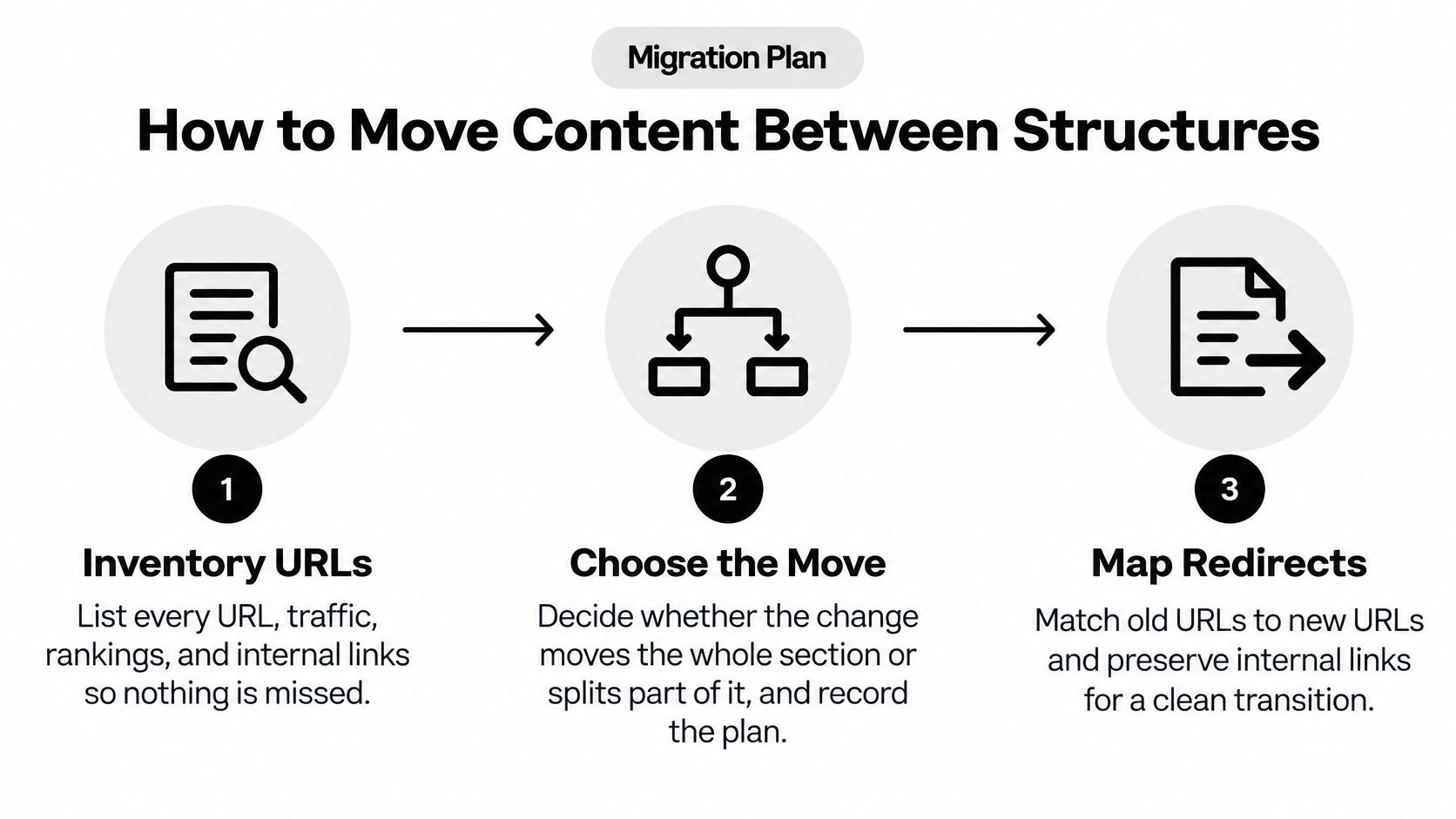
- Inventory every URL in the section. Record traffic, rankings and internal links for each one, because a page nobody links to and nobody visits doesn't need the same care as your top landing page.
- Decide whether the change moves the whole section or splits part of it. Write the target structure down. Half-migrated sections are where canonical tags contradict redirects for months.
- Map each old URL to exactly one new URL with a 301. Never redirect a deep page to the homepage. A one-to-one map preserves the relevance the old URL earned.
- Update the signals. Canonical tags, internal links, hreflang if you run it, and both sitemaps should all point at the new URLs before you announce the change.
- Set up DNS and certificates. Create the subdomain record or delegate with NS records, then issue a certificate covering the new hostname. Verify the chain from a device that isn't your laptop.
- Fix analytics before you need the numbers. Update properties, tag manager settings and cookie domains, then confirm events fire on both the old and new hostnames during the transition window.
- Submit the new sitemap and watch. Crawl errors, index coverage and redirect chains need several weeks of attention. What you do with that data is where improving search rankings starts.
The slips that cost the most
Redirect chains rank first. Each extra hop in a 301 sequence dilutes the signal and slows every crawl, and they appear the moment someone redirects A to B, then later redirects B to C. Map directly from the original URL.
Second slip: delegating a child zone and forgetting the parent. Records you left behind stop resolving. Third: dropping old canonical tags on pages that still respond, which leaves two URLs claiming to be the preferred version.
A clean migration looks boring. Every old URL answers with a single 301, the new property shows stable traffic within a few weeks, and the index report adds no new errors.
Confirm the Structure Before You Commit
Score the section against seven criteria. Each one points either toward separation, which means a subdomain, or toward consolidation, which means a subdirectory.
- Team ownership. A different team, vendor or agency runs it, with its own access controls and its own on-call rotation. Separation.
- Release cadence. It deploys on a schedule that would block the main site, or would be blocked by it. Separation.
- Legal entity. A different company, country or contracting party is responsible for it. Separation.
- Authentication. It needs its own session boundary, login flow or SSO policy. Separation.
- Analytics. You need separate reporting that shouldn't be reconciled monthly. Mild separation.
- SEO consolidation. The content competes for the same queries as the main site and depends on internal links from it. Consolidation.
- Later domain migration. You expect to move it to its own domain within two years, at which point one more hop is cheaper than a rebuild. Separation.
Four or more criteria pointing to separation makes a subdomain the stronger choice. Most criteria pointing to consolidation makes the subdirectory simpler and cheaper to operate.
Why separation can be the strategic answer
Cloudflare's zone setup documentation describes subdomain setup as a way to manage a child zone independently from the apex domain, potentially in a separate account, with separate configuration and separate access controls. This is the main argument. A subdomain provides controlled autonomy for a help center, an app, a marketplace, a regional operation, or an acquired product, and it does so without fragmenting the brand.
That autonomy has a price, and you should name it out loud. Fragmented analytics, duplicate-content risk, inconsistent branding and harder internal linking are the four costs that show up in the first quarter after the split. Weigh them against the operational gain before you sign off.
Accept either structure when canonicalization is handled properly. Then answer the measurement question, because it's the one nobody writes down: does the separation gain exceed the reporting overhead you're taking on? If the answer is unclear, choose the subdirectory and revisit in six months with data.
Write the decision down today. The criterion that drove it, the runner-up and the reason it lost, and a review date six months after launch. Confirm the redirect map and canonical plan from the migration section before anything goes live. A recorded decision is what stops the same argument from restarting in every planning cycle.
If you're weighing a structure change for a launch, SubmitMySaas is built for exactly that moment. Makers submit a product launch to reach daily launch feeds, trending lists and monthly roundups, and a launch listing gives new pages an early signal and a link from a curated directory while search engines are still forming their first impression. Free Launch costs $0 with 10 free slots each week, and Premium Launch at $19 per launch adds priority placement in an available Monday slot. Head to SubmitMySaas and put your next release in front of people who are actively looking for it.