By Outrank
Categories of SaaS: Types, Examples and How to Choose
Learn the main categories of SaaS, how horizontal and vertical software differ, and real product examples in each category to pick the right tool.
On this page
A founder opens a spreadsheet with fourteen tools on it. Six are listed as "project management," two as "CRM," one as both "CRM" and "email marketing," and the new AI note-taker has no label at all. The tools aren't the problem. The vocabulary is. Once you can name the row a product belongs in, the comparison list shrinks and the buying decision gets easier.
SaaS gets sorted by business function first, because function is what a buyer searches for when a budget line opens. Industry comes second: a restaurant operator and a clinic manager both need scheduling, but they don't buy the same scheduling product. Deployment model comes third, and it matters more than most buyers expect. Hold all three in view and you get a map instead of a pile.
The Main SaaS Categories and Example Products
The table below is the lookup step. Read down the core job column and find the sentence closest to the problem in front of you, then note the example products in that row.
| Category | Core job | Example products | Typical buyer |
|---|---|---|---|
| CRM | Tracks leads, deals and customer relationships | Salesforce Sales Cloud, HubSpot CRM, Pipedrive | Sales and revenue teams |
| ERP | Runs finance, inventory, procurement and operations in one system | NetSuite, Microsoft Dynamics 365, SAP S/4HANA Cloud | Mid-size to enterprise operations |
| Accounting and finance | Bookkeeping, invoicing, expense tracking and tax preparation | QuickBooks Online, Xero, Sage Intacct | Small businesses and finance teams |
| HR and people management | Hiring, payroll, benefits and performance reviews | Workday HCM, BambooHR, Rippling | HR and people operations |
| Project and work management | Plans tasks, timelines and workloads | Asana, monday.com, Jira | Product, operations and agile teams |
| Collaboration and productivity | Documents, chat, video and shared workspaces | Microsoft 365, Google Workspace, Slack | Whole organisations |
| Marketing automation | Email, customer journeys, lead scoring and campaign tracking | HubSpot Marketing Hub, Mailchimp, ActiveCampaign | Marketing teams |
| Customer support and helpdesk | Ticketing, live chat and knowledge bases | Zendesk, Freshdesk, Intercom | Support and customer success teams |
| Business intelligence and analytics | Dashboards, reporting and data exploration | Tableau, Looker, Power BI | Analysts and executives |
| Developer tools and DevOps | Source control, CI/CD, monitoring and cloud management | GitHub, GitLab, Datadog | Engineering teams |
| Security and compliance | Identity, access control and audit evidence | Okta, Vanta, Drata | IT, security and compliance teams |
| Vertical SaaS | Industry workflows such as clinic scheduling or property management | Jane App, AppFolio, Toast | Operators within one industry |
Two habits make this table useful. The core job drives the purchase, not the feature list on the pricing page. A team buying Zendesk is buying a queue that never loses a ticket, not a chat widget. And many products sit in more than one row, which is why the table is a starting point rather than a verdict. Jira is project management with a strong developer bias. HubSpot appears under CRM and again under marketing automation because one product covers both jobs.
Directory builders run into the same overlap. We file projects on SubmitMySaas under categories including Artificial Intelligence, SaaS, Productivity, Marketing Tools and Developer Tools, which is this functional logic in browsable form.
Suites create a second kind of overlap. A team that buys a collaboration suite usually bolts on a creation tool next, and if you're producing demo or explainer clips inside the same workspace, ClipNova's AI video creator is the kind of add-on that sits beside the suite rather than inside it.
Pick the row that matches your problem, then write down the two or three neighbouring categories. That short list is what you'll really compare, and it's usually shorter than the spreadsheet.
Horizontal and Vertical SaaS Compared by Breadth and Depth
Salesforce was founded in 1999 and brought customer relationship management to the cloud, a milestone the company recounts in its own history. A CRM is a horizontal product: the job of tracking customers exists in every industry, so one workflow can be sold everywhere. Vertical SaaS grew up beside it, and market analysts consistently describe the vertical segment as one of the faster-growing parts of the software market, driven by industries that generic tools serve poorly.
Those are different businesses, and the split matters more than any feature comparison. Horizontal SaaS serves many industries through shared functions such as CRM, collaboration, accounting or marketing. Vertical SaaS is built for one industry, such as healthcare, education, retail or real estate, and carries that industry's rules inside the product.
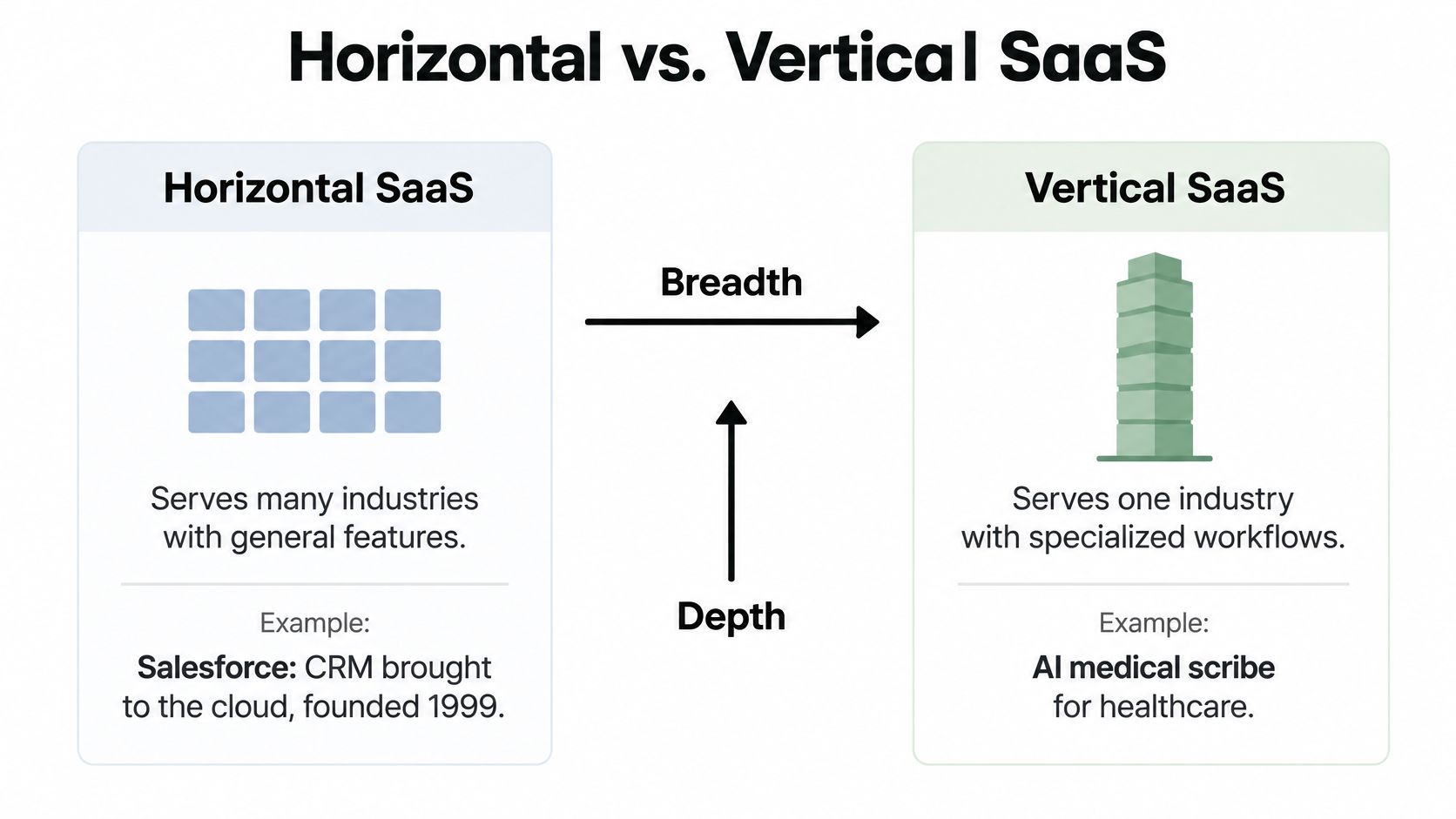
The examples make the difference concrete. Salesforce, Asana and QuickBooks Online sell the same workflow to a bakery, a law firm and a robotics startup. Toast sells restaurant operations, AppFolio sells property management, and Jane App sells clinic scheduling. Nobody buys Toast to run a law firm.
A useful way to read any product: horizontal tools work like a well-stocked hardware store, useful to everyone in town, while vertical tools work like a contractor's van, kitted out for one trade and awkward for any other.
| Criterion | Horizontal SaaS | Vertical SaaS |
|---|---|---|
| Market scope | Many industries through shared functions | One industry with specialised workflows |
| Example products | Salesforce, Asana, QuickBooks Online | Toast (restaurants), AppFolio (property), Jane App (clinics) |
| Addressable market | Larger, because one workflow sells across sectors | Smaller, concentrated in one sector |
| Competition | Crowded, with many rivals on similar features | Fewer rivals, competing on depth |
| Configuration effort | Often extensive to fit each customer | Industry templates and rules built in |
| Buyer switching cost | Moderate, tied to general data | Often high, tied to industry data and integrations |
Read the table as a single trade-off. A horizontal product can be sold to almost any industry, but it faces heavier competition and needs extensive configuration for each customer. A vertical product gives up breadth for workflow depth, regulatory knowledge, terminology and domain data, and that depth usually raises switching costs because the data inside it is hard to recreate elsewhere. If you want the longer version of this distinction, what vertical SaaS means in practice covers the economics and the operating model.
Real estate shows how deep the vertical layer goes. Agents need more than a contact database: listing workflows, showing schedules and transaction coordination all sit inside the same working week, which is why a roundup of the software stack for listing agents reads so differently from a general CRM comparison. The categories barely overlap, even though both lists contain tools that store names and phone numbers.
The sorting logic pays off at this point. Start with the job that drives the purchase. If the job is generic, like invoicing or task tracking, you are shopping horizontal rows and comparing on price and fit. If the job only exists inside your industry, like menu management or patient intake, you are shopping a vertical row and comparing on depth. Only after that should you weigh market scope and deployment model, because those two factors narrow the shortlist faster than any feature grid.
The relabelling test: if the core workflow only makes sense inside one industry, the product is vertical. If a generic workflow has been renamed with industry language and nothing else changed, it's a horizontal product wearing a vertical label.
Which Categories Generate the Most SaaS Revenue
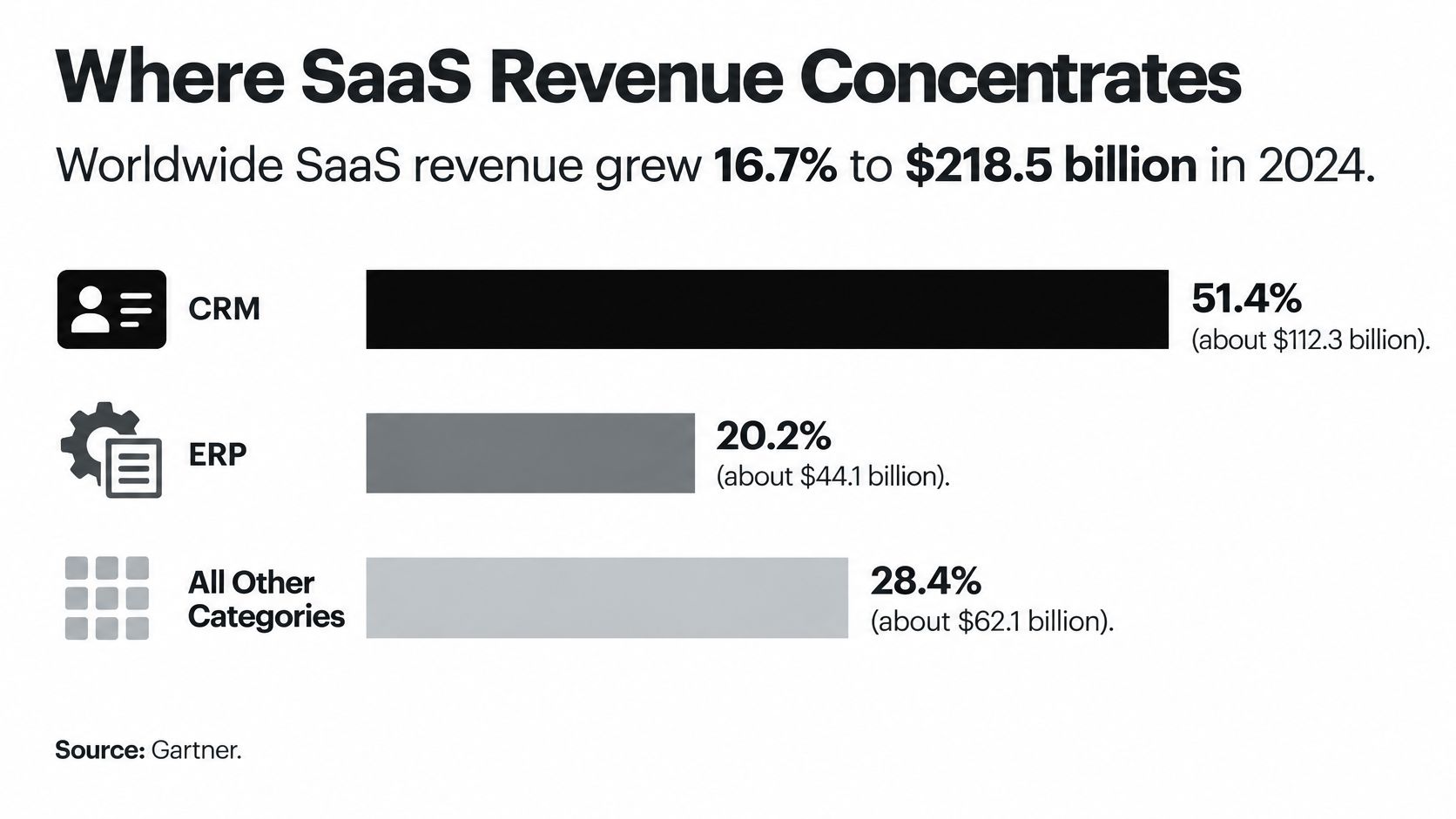
Money concentrates. Gartner reported that worldwide SaaS revenue grew 16.7% to $218.5 billion in 2024, with CRM accounting for 51.4% of that revenue and ERP for 20.2%, according to Gartner's SaaS revenue figures. The remainder, roughly 28%, covers every other category combined: accounting, HR, marketing automation, support, collaboration, analytics and the vertical segment.
What a revenue share actually tells a buyer
A 51.4% share means budgets concentrate in one row of the table. It doesn't mean CRM is the easiest place to launch a product or the easiest place to buy one. Large categories attract more rivals, which means more comparison work and a longer shortlist. Build that shortlist early and cap it at three products before you start booking demos.
Smaller niches behave the opposite way. Fewer options, more specialised features, and a real risk that the tool covers half the job and leaves the rest in a spreadsheet. Before committing to a niche product, check whether it handles the whole workflow or just the part with the nicest interface.
Gartner also forecast worldwide cloud application services, the SaaS category, to generate $247.2 billion in end-user spending in 2024, up 20.0% from 2023, per Gartner's public cloud spending forecast. That figure uses a different scope from the revenue numbers above, so don't add the two together or treat them as a growth rate against each other. If you're modelling what a subscription is worth to you as a buyer, how monthly recurring revenue works explains the maths vendors use.
Practical rule: when a category is large, shortlist fast and compare on integrations. When it's small, verify coverage of the full job before you sign.
Placing AI and Multi-Category Products
Take one product. An AI medical scribe listens to a consultation, drafts the note and files it to the record. Is that healthcare software, clinical workflow software, productivity software or an AI agent? All four, and a directory label like "AI SaaS" tells a buyer almost nothing about whether it fits.

AI is increasingly a capability embedded across established categories rather than a market boundary of its own. The spending is real, though: enterprise AI spending reached $37 billion in 2025, while vertical AI alone reached $3.5 billion, nearly triple its 2024 level, according to Menlo Ventures' enterprise AI report. Buyers still need a placement method, not a spending headline.
Five dimensions that place an AI product
Work through them in order and the label problem disappears:
- Primary workflow. What recurring job does the tool take over? Note drafting, ticket triage, contract review. This becomes the primary category.
- Industry specificity. Does the workflow only exist inside one sector? If yes, it's vertical.
- AI role. Assistant, copilot, agent or infrastructure. A writing helper inside a document editor is productivity software with an assistant role, not a new category.
- Deployment model. Who hosts it, and where does the data sit? More on this below.
- Risk level. A tool that touches clinical notes, financial records or employment decisions carries obligations a brainstorming assistant doesn't.
Name the primary category first, then attach secondary tags. That gives you "healthcare, clinical documentation, AI assistant" instead of "AI tool," which is what a buyer can search and compare.
The three-step placement test
When a product resists classification, run this:
- Find the job the buyer hires it for. Not the job the marketing page emphasises. If a team buys a tool to stop losing support tickets, it's a helpdesk product regardless of the AI in the backend.
- Find where most daily work happens. Whichever screen a person lives in for six hours is the actual category.
- Find the system of record. Where must the data live so the business keeps running if the tool disappears? That answer decides whether you're looking at a primary system or a satellite.
Placement rule: classify by the job that drives the purchase, not by the feature list on the pricing page.
When a suite spans several rows
Microsoft 365 covers collaboration, email, documents and shared workspaces, so it appears in one row but displaces tools from three. HubSpot started in marketing and now sells CRM, marketing, service and content tools, which puts it in several rows at once. Slack belongs to collaboration, yet plenty of teams run support conversations through it, which is why helpdesk vendors sell Slack integrations rather than pretending the channel doesn't exist.
Three edge cases trip people up. A product listed under two directory categories is usually a suite with a clear centre of gravity, so pick the centre. A vertical product with a generic core, such as a clinic scheduler built on a calendar engine, is still vertical because the workflow around the engine is industry-specific. And a cheaper suite that does each job adequately will lose to a specialist on the one job that matters most, so decide which job that is before you compare prices.
How Deployment Model Splits SaaS Products
Two accounting tools can look identical in a demo and behave nothing alike in production. One runs on shared infrastructure with your data logically separated from every other customer's. The other runs on dedicated resources you control. Same invoices, same reports, different answers to your auditor.
Multi-tenant SaaS runs one codebase on shared infrastructure while logical controls keep each tenant's data apart. NIST's cloud computing guidance identifies resource pooling and dynamic assignment of shared resources as defining cloud characteristics, and it warns that implementation or provider-management flaws can create reliability and security risks in pooled environments. That's the trade in one sentence: lower cost and faster releases, on a shared failure boundary. One incorrect tenant filter can expose one customer's records to another.
The shift to hosted delivery didn't happen overnight. Gartner predicted that 25% of new business software would be delivered as SaaS by 2011, up from 5% in 2005, a forecast reported at the time by Network World's account of the shift to hosted delivery.
| Model | How it works | Who it suits | Trade-off |
|---|---|---|---|
| Multi-tenant public cloud | One codebase and shared infrastructure, with logical isolation per customer | Self-serve and mid-market products | Lowest cost and fastest releases, but a shared failure boundary |
| Single-tenant or dedicated | One customer gets isolated application resources | Large enterprises needing custom controls | Stronger isolation and customisation, at higher cost and slower updates |
| Private cloud or hybrid | Provider-managed services run in customer-controlled infrastructure | Regulated sectors such as finance and government | Strongest control, but the most complex to run |
The isolation questions worth asking
Buyers can push past the marketing by asking about specific layers rather than the word "secure." Ask about compute, application process, database, schema, storage, encryption keys and network perimeter. Enterprise, healthcare and public-sector buyers usually need stronger isolation, regional data placement and customer-managed identity on top of that.
What to ask a vendor: which of those seven layers are shared with other customers, and which are dedicated to us?
Before you compare features between two HR or accounting products, confirm the deployment model each one uses. It decides data residency, uptime commitments and the compliance evidence you can hand to an auditor, and no feature comparison survives getting those wrong.
Pick the Category That Matches Your Problem
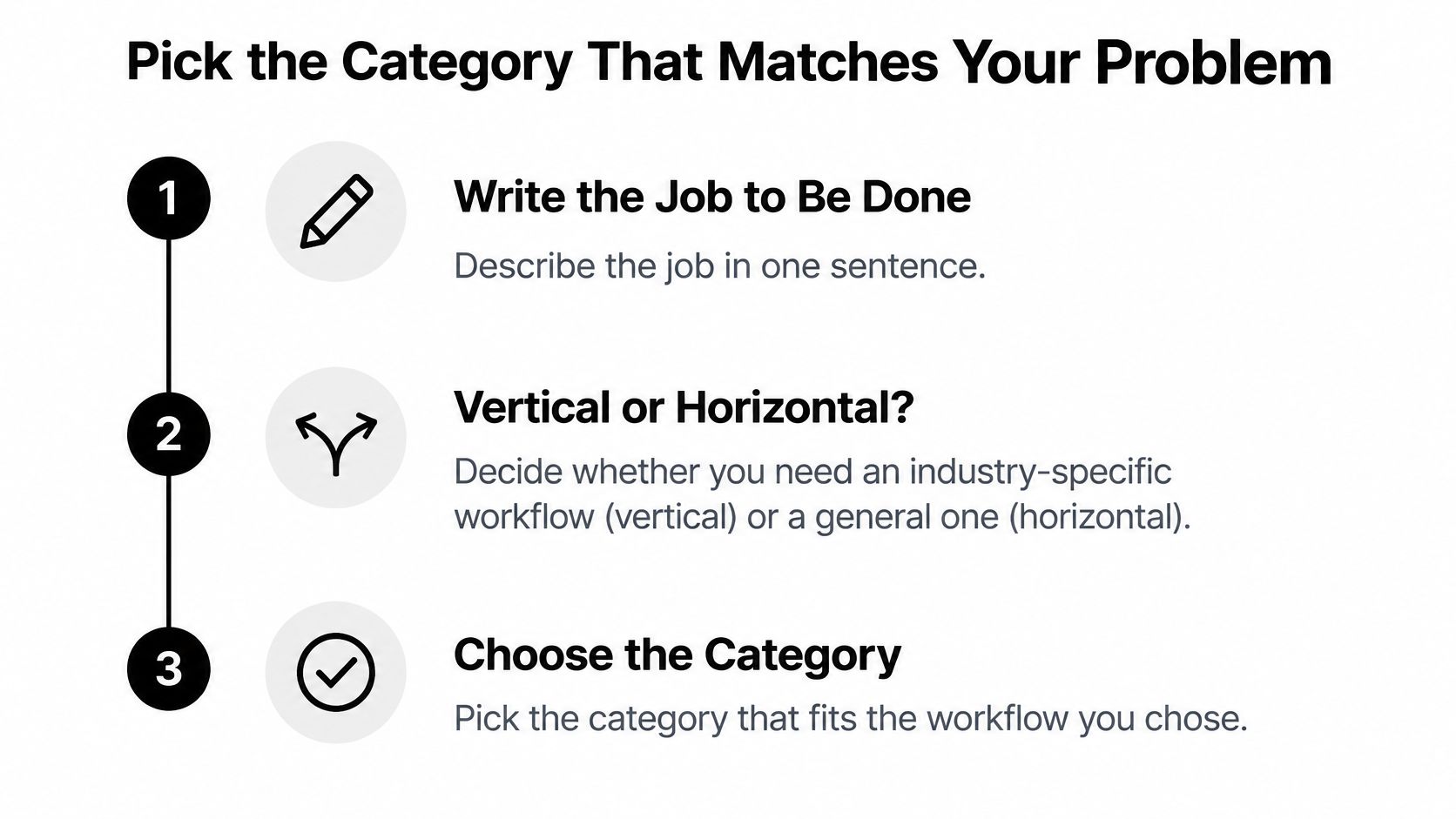
A founder comparing twelve tools at once usually has twelve tabs open and no way to rank them. The fix is ordering, not more research. Each tool maps to one row of the category table through the job that drives its purchase, and market scope plus deployment model narrow that row before any feature comparison starts. Six steps, in this order, take you from a messy tool list to a shortlist you can defend.
- Write the job in one sentence. "We lose track of inbound leads" is a CRM problem. "We can't close the month without three spreadsheets" is an accounting or ERP problem. If the sentence needs an "and," you have two problems and probably two purchases.
- Decide whether the workflow is industry-specific. A dental practice needs charting, insurance claims and recall scheduling. A consultancy needs a timesheet. Same word, different product. This step answers the vertical question.
- Choose the deployment model your obligations require. Regulated work, customer data residency or contractual audit rights will rule out some products before you ever see a demo.
- Check whether AI is the core job or an add-on. If the job is "draft the note," AI is the product. If the job is "keep the record accurate," AI is a feature you evaluate inside a records system.
- Count how many teams share the same data. Two teams sharing one dataset usually want a suite. Five teams with five separate jobs usually do better with single-purpose tools and clean integrations.
- Shortlist two or three products from the matching row. Compare on integrations, data export and total cost over three years rather than the monthly sticker price. The FinOps Foundation's guidance on SaaS unit economics makes the reason plain: cost only becomes meaningful when you tie it to a unit such as tenant, active user or processed record.
What a clean shortlist looks like
One primary category, one or two tags, and a named system of record. For example: primary category, customer support; tags, healthcare and AI assistant; system of record, the practice management platform, with the helpdesk as a satellite that syncs into it. That single line tells you what to compare, what must integrate and what happens if the vendor disappears.
The same discipline applies at the small end. A single-purpose tool built for a narrow job is a different bet from a vertical platform that runs an entire department, and what separates micro-SaaS from a vertical product is worth reading before you assume a cheaper tool covers the same ground.
Industry language gets slippery here, especially in travel and hospitality, where booking, payments and guest messaging blur together. If that's your sector, it helps to see how operators compare tour operator platforms before assuming one product owns the whole workflow.
Steps two through five are where most shortlists go wrong, because buyers skip ahead to demos before the row is fixed. A vertical product demoed against a horizontal one looks impressive in the wrong ways, and a suite compared against a single-purpose tool wins on breadth every time while losing on fit. The ordering protects you: job first, scope second, deployment third, features last.
When you're ready to browse, the Categories page on SubmitMySaas groups listings by category, and you can move through the Launch archive and Trending page to see what's shipping this week. Listings can be filtered by pricing model, and each one carries the maker's own description of what the tool does. Confirm pricing and terms on each vendor's own site, since makers report their own pricing and it changes. If you're still placing a product in the right row, start with the categories that match your problem and work outward from there. Visit SubmitMySaas to explore the directory and see how the tools you're weighing are filed.