By Outrank
SaaS Directory Listing: A Step-by-Step Guide for Founders
Learn how to create, optimize and promote a SaaS directory listing, from the copy and assets checklist to submission, SEO setup and tracking results.
On this page
You shipped the product last month. The homepage is live, the demo works, and the only people who have tried it are friends who already had the URL. A buyer looking for a tool like yours is not starting on your site. They are scanning directory cards, comparison pages, and AI answers built from those public profiles.
A SaaS directory listing is a product page you can measure, not a one-time backlink you forget after launch day. It should tell a person and an assistant the same facts: what the product does, who it is for, what it costs, and what it will not do. If those fields are vague, the listing fails before anyone ranks it.
I would treat the first submission as a test asset. Build the copy once, place it where buyers already browse, then judge it on signups and retained users, not on a ranking screenshot.
Assemble Your Listing Copy and Asset Checklist
Most submissions die on the tagline. A missing logo is obvious. A line like "the all-in-one platform for modern teams" gets through the form and still tells nobody what to buy.
Write the tagline at 60 characters or fewer, and name the job plus the person. "Invoice reminders for freelance designers" is a card someone can scan. Then write a 150 to 200 word description covering the problem, the core workflow, the integrations, and who the product is not for. Founders skip that last line. It stops a bad match, and it gives an assistant a limit it can quote without guessing.
G2's 2025 buyer behavior research reports that 79% of software buyers say AI search has changed their research behavior, and that review sites and AI search are the two leading research sources for enterprise buyers, at 56% and 55%. State category, use case, company size, integrations, pricing model, setup needs, security notes, and limits as plain facts. Keep slogans out of those fields.
You keep ownership of what you submit, and you grant us permission to display and use that content on the platform. That is another reason every claim should be checkable. Listings get pulled when pricing, security, or customer counts cannot be verified.
Fields that have to be ready
| Asset | Recommended spec | Why it matters |
|---|---|---|
| Tagline | 60 characters or fewer | Shown on directory cards and in search snippets |
| Short description | 150-200 words | Gives buyers and AI tools enough context to compare |
| Logo | Square PNG, at least 512 x 512 px | Stays sharp in cards and thumbnails |
| Screenshots | 3 to 5 images, 16:9, 1280 x 720 | Shows the real interface buyers will use |
| Demo clip | 30-60 seconds | Lets buyers see the core workflow quickly |
| Category and tags | 1 primary, 2-3 secondary | Determines where buyers browse and filter |
| Pricing model | Free tier, per-seat, or usage based, with a starting price | Answers the first buyer question |
| Canonical URL | One live HTTPS page | Backlinks and tracking should point here |
| Last updated date | Current month | Signals that the listing is maintained |
A tight script beats a tour of every menu. These product demo scripts and examples show how to walk through one workflow in 30 to 60 seconds. If the description still feels fluffy, run it through this guide on how to write product descriptions before you paste the same copy into every form. Save the set in one document. Change the character limit, not the facts.
Choose Categories Where Buyers Already Browse
G2's 2024 Buyer Behavior Report surveyed more than 1,900 B2B software decision-makers globally and found that 31% consulted public product-review websites more often than other information sources when planning a business purchase. Category placement is how those buyers filter before they email you. The same research found that 21% considered contacting a sales professional during discovery, so the listing has to do that early sorting.
Crowding is the trade-off. The two largest categories on our list are tied, and Design Tools is the smallest field. A wide category gives reach and buries a generic tagline. A narrow one is easier to stand in, but only if buyers filter there.
| Category | Listed projects | How to position inside it |
|---|---|---|
| Artificial Intelligence | 268 | Lead with a specific use case, since reach is high but competition is dense |
| SaaS | 268 | Pair the general label with a niche buyer or workflow |
| Productivity | 191 | Emphasize the job the tool replaces or speeds up |
| Marketing Tools | 112 | Name the channel or metric the tool improves |
| Design Tools | 61 | Smaller field, so stand out through a clear design-workflow claim |
Read what is already winning
We rank products weekly under Top Projects and Last Week's Best, and monthly under This Month's Best. Read those lists before you lock a category. You will see which taglines name a job, and which ones only restate the category.
Pick one primary category the product clearly belongs in, then one or two secondary categories for a second job. Write down why you chose each. A label that sounds right in a roadmap meeting often fails the filter a buyer really clicks.
Search your target phrases on the category pages and ask whether this product would land on the first page of that category with the tagline you already wrote.
If it would not, the category is wrong, or the tagline is. Fix that before you submit anywhere else.
How to Submit to Directories in Seven Steps
Build the shortlist before you open a single form. The sequence below is the one I would follow so a bad description gets caught in a small batch, not after fifty live pages.
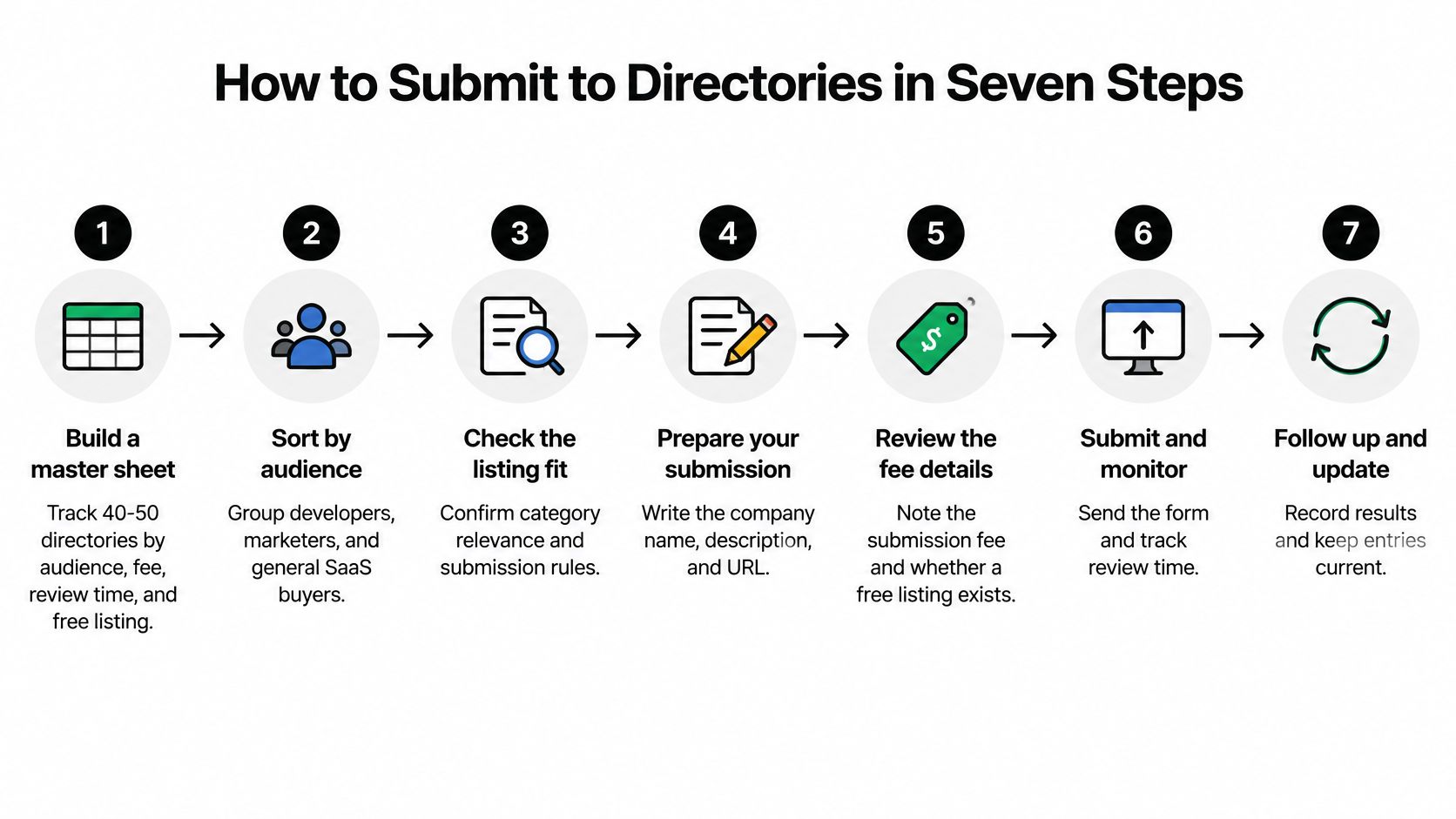
- Build a master sheet of 40 to 50 directories. Sort rows by audience: developers, marketers, or general SaaS buyers. Note the fee, the review time, and whether a free listing exists. A sheet tied to audience stops you from dropping a developer tool onto a marketing-only board because the domain looks strong.
- Submit to 5 to 10 high-fit directories first. This batch tests the checklist. If three editors bounce the same description, fix the copy before a wider push.
- Paste the checklist fields exactly. Keep one tagline and one description so the public pages agree. Mismatched pricing across sites makes the claim harder to trust.
- Upload the assets at the sizes you prepared. Open the preview on a phone, where cards cut text. A soft logo or a tagline that ends mid-word undoes the writing.
- Match category and tags to the choices you already made. Use the phrases buyers search, not the label that sounds bigger on a pitch deck.
- Save status, the confirmation email, and the live URL. Those emails expire or land in spam. Without the URL you cannot audit the page later.
- After approval, read the live page yourself. Log errors and fix them within a week. A healthy listing shows the right logo, a readable description, working links, the correct category, and a visible last-updated date.
The walkthrough below covers the same checks if you would rather watch them than read the sheet.
We can remove any content if we believe it violates the terms or might harm the platform, users, or third parties. Review every live listing monthly, and update pricing or features the same day they change. Stale details are the usual reason a ready buyer leaves.
Make the Listing Page Rank With Schema and Indexing
A listing page helps only if a crawler can read it. Google's software app structured data guidance lays out a controlled order. Skipping a step is how pages sit unpublished for weeks.
- Publish a server-rendered detail page. Crawlers should read the name, price, and description without waiting on JavaScript.
- Add JSON-LD using the Schema.org SoftwareApplication type.
- Include required properties, including the software name and the offer price.
- Validate the markup with Google's Rich Results Test.
- Inspect a representative URL in Search Console.
- Confirm that robots.txt, a noindex tag, a login wall, or another access control is not blocking the page.
- Submit or update the XML sitemap.
Google notes that crawling and re-indexing can take several days. Judge launch day in Search Console. Do not assume the page is in results because a form said "published."
Markup is not a ranking promise
Structured data helps Google understand the page and may enable a richer appearance. Eligibility is not guaranteed. Markup that does not match the visible page, or that omits a required field, can make the page ineligible for rich results.
Practical rule: Keep every JSON value identical to the checklist and to the text a buyer can see. If the page says "from $29 per seat" and the markup says "free," fix the markup, not the story.
After each launch batch, watch indexed status, impressions, clicks, and branded versus non-branded queries. That split shows whether the page earns discovery or only appears when someone already knows the product name.
Judging Backlinks and Launch Packages Before You Pay
A directory link is not valuable because it exists. Five signals decide whether it is worth the fee or the afternoon.

- Dofollow or not. A nofollow mention can still send a buyer. It does not pass the same equity. Know which one you are getting.
- Topical fit. A design-tool profile on a hosting directory is a stray link. The page should sit next to products a buyer would compare.
- Indexed. If the listing URL is blocked or never crawled, the backlink is a private note.
- Real visits. Open the directory's own category and see whether anyone is browsing. A link on a page nobody opens will not produce a demo.
- Link neighborhood. A thin page with dozens of outbound links dilutes the one you wanted.
A free launch is a conditional case, not a default win. A Free Launch gets a dofollow backlink only if the product ranks in the top 3 weekly and displays the SubmitMySaas badge on its own site. That means you plan the launch day, ask supporters to engage, and decide whether the badge fits the product site. We are not responsible for the content, policies, or practices of third-party websites or services we link to, including projects, so the same five checks apply to every other directory on the sheet.
No single directory should carry the SEO plan. Mix relevant niche boards, a few established review sites, and pages that earn links because the product is useful. When you compare a paid add-on the way you would compare any subscription, explore family AI plan options with the same question: what do you still get if a ranking condition is not met?
Guaranteed domain ratings, listing pages hidden from search, and sites that stamp out a thin duplicate profile for every product are not a distribution plan.
Track Listing Results and Plan Your Next Launch
Clicks are a weak scorecard. Pew research cited by Search Engine Journal found that only 8% of users who encountered an AI summary clicked a link in the summary or the standard results, while Similarweb data reported by The Register indicated AI referrals had replaced only about 10% of traditional search referrals. A listing can still be working when the click graph looks flat.
Give each directory its own annotated analytics link. Tag referral visits. Record the first-touch source on every signup. Add a one-question survey after launch: "How did you find us?" Then read the numbers at 30, 60, and 90 days.
| Metric | Where to read it | Review point |
|---|---|---|
| Indexed listing pages | Search Console | Day 30 |
| Qualified referral visits | Analytics with annotated directory link | Day 30 and 60 |
| Demo signups from directory | Analytics, first-touch source | Day 30 and 60 |
| Branded search lift | Search Console, branded queries | Day 60 and 90 |
| Retention by signup cohort | Product analytics | Day 90 |
| AI citations of your product | Manual checks on AI search tools | Day 90 |
A visit that never becomes a demo or a retained user is a vanity metric. A link with no visits is just a URL in a spreadsheet. If you want the revenue view of that split, this walkthrough on how to attribute MRR to acquisition channels shows how to tie a signup cohort back to the directory that started it. Our notes on how to measure a SaaS launch cover the same 30, 60, and 90 day read for the rest of the launch, not only the directory row.
Questions about the terms can go to support@submitmysaas.com. Keep the directories that send qualified visits or signups. Drop the ones that produce a link and nothing else. Reuse the copy set on the next launch instead of rewriting the product from scratch.
SubmitMySaas is a launch and discovery platform for SaaS, AI, productivity, marketing, and design tools, with weekly rankings and category pages built for the listing this guide describes. Put the checklist, the category choice, and the tracking links to work on a real profile instead of another draft. Visit SubmitMySaas and submit the product with copy you can stand behind.