Product Launch LinkedIn Post Examples: 7 Proven Templates
Explore seven product launch LinkedIn post examples with annotated templates, CTAs, copy formulas, and visual tips for SaaS and AI launches.
You've shipped the product, checked the landing page, and published your LinkedIn announcement. It has a logo, a tagline about making work easier, and a link. A few people like it. Nobody seems to click, and you're left wondering whether the product needs a better pitch or a different audience.
The post may give readers too little reason to act. In MagicPost's launch-announcement benchmark, launch posts received a median 36 likes but only 5 comments, suggesting that approval and conversation aren't the same outcome. Your opening line, proof, visual format, and call to action need to work together.
If you want to outpace competitors with faster launches, prepare distribution alongside the product, not after release. These product launch LinkedIn post examples give you seven adaptable formats, from a founder announcement to a follow-up recap. The templates use placeholders deliberately: replace them with facts you can verify, not impressive-sounding claims.
1. Founder Story Launch Post (Problem → Build → Launch → Ask)
Use a founder story when you personally understand the problem and your company name won't mean much to readers yet. For a solo developer launching a client-reporting tool, a frustrating reporting workflow is a stronger starting point than a company introduction.
Distribution deserves attention, too. An analysis discussed by Entrepreneur found that company-page posts reached about 1.6% of followers on average, so don't assume a polished brand announcement will reach your network.
An Adaptable Founder Template
I kept [specific recurring problem] whenever I tried to [task].
The tools I used handled [existing capability], but I still had to [manual workaround].
That's why I built [Product]. It lets [specific audience] [concrete workflow].
It's now available, including [verifiable capability].
Try [workflow] and tell me where you get stuck.
- Opening line: Name the frustrating task before introducing the product. Keep the backstory relevant to the reader.
- Proof element: Show a working capability, actual beta feedback, or a measured result. A specific feature is better than an unsupported time-saving claim.
- Visual choice: Use a screenshot of the workflow rather than a logo alone.
- CTA wording: Ask for a trial or feedback, not a trial, share, vote, and follow together.
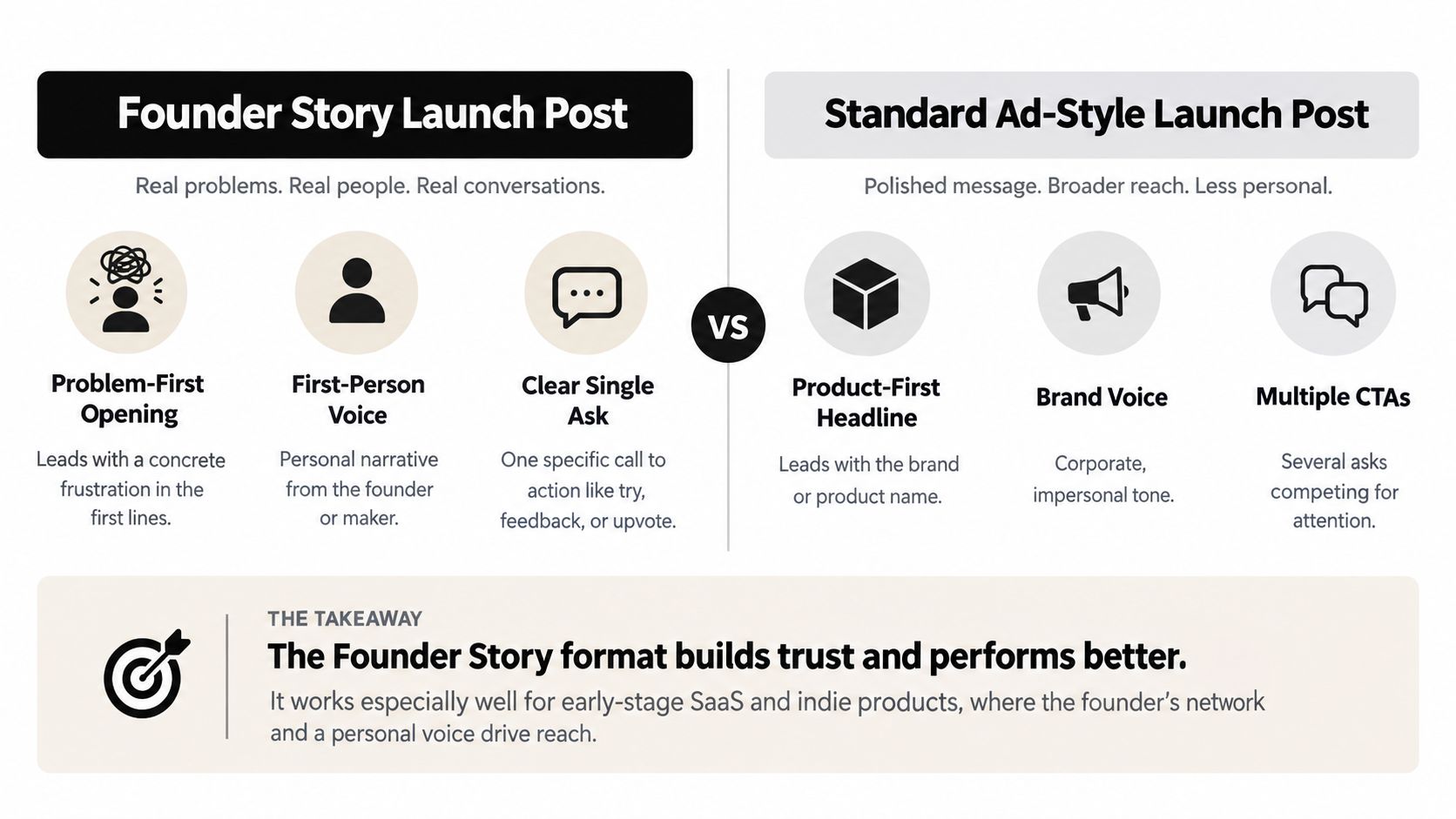
Common failure point: The founder's journey takes over, and readers never learn what they can do with the product. Keep the story connected to the workflow, then use this SaaS product launch guide to coordinate the announcement with onboarding and distribution.
2. Carousel (Document Post) Product Walkthrough
A document walkthrough suits products that need explanation across connected steps. For a design tool, that might mean moving from a brief to an editable layout; for a productivity tool, it might mean turning scattered requests into an organized queue.
AuthorUp's LinkedIn format analysis reports that native documents averaged 7.00% engagement, compared with 4.50% for text-only posts. That supports testing documents, not promising that every carousel will outperform text.
Build Around a Task, Not a Feature Catalog
Caption template: “Still moving [input] between [disconnected tools]? [Product] brings [workflow] into [specific workspace]. This walkthrough shows the process, including [important limitation]. Try it through the product link in this caption.”
- Opening line: Put the recognizable problem on the cover. “From scattered client feedback to an approved revision” says more than “Meet our new platform.”
- Proof element: Show actual interface states, including the input and finished output.
- Visual choice: Give each slide a clear purpose and a readable screenshot. Use strong contrast and repeat essential information in accessible caption text.
- CTA wording: Close with “Try this workflow with your own [input].” Include the destination in the caption, not only inside the document.

A LinkedIn carousel maker can support asset preparation, but review the exported document on a phone before publishing. Tiny labels and screenshots that require zooming undermine the walkthrough.
Common failure point: Readers finish the slides without understanding the next step. Pair the carousel with a founder announcement, then let the document answer how the product works.
3. Native Video Demo Launch Post
Lead with video when the product's value becomes clearer through movement: an automation runs, an interface changes, or an AI tool produces an editable output. A real workflow is more useful than a cinematic montage of dashboard screens.
LinkedIn's 2024 B2B research found that 63% of B2B buyers said short-form social video helps inform purchasing decisions. Treat that as a reason to demonstrate the product clearly, not permission to publish a generic promotional clip.
Script the Result Before the Introduction
Opening line: “Watch [Product] turn [real input] into [useful output], without [manual step it removes].”
Demo sequence: Show the starting material, perform the task, and inspect the result. For an AI writing tool, include the editing step instead of implying the first output is automatically ready to publish.
Proof element: Keep the input and output visible. If you cut waiting time from the recording, disclose the edit rather than presenting an artificial speed claim.
Visual choice: Upload the demonstration directly to LinkedIn, use readable cursor movements, and check captions for product names and technical terms. Include enough written context that the post makes sense without sound.
The supplied video is embedded below.
Practical rule: Show the part buyers need to evaluate, not just the part that looks impressive.
CTA wording: “Try the same workflow with your own [input].” Use the product demo video guide for preparation and the social video advertising guide when adapting assets for paid promotion.
Common failure point: The demo looks effortless because it hides setup, corrections, or restrictions. State those constraints before asking viewers to sign up.
4. Early Access or Waitlist Announcement Post
When a product needs compatible integrations or hands-on onboarding, a phased release can help the team learn from suitable users before opening access more widely. Explain that reason plainly. Readers need to know what they can try, what remains unfinished, and what happens after they apply.

For example: “We're opening early access to [Product] for [specific audience] working on [problem]. You can use it to [available workflow], and we'll provide [support]. [Unfinished capability] is still in development, so the product may not suit teams that need [requirement]. Apply at [application destination]. After reviewing your workflow, we'll explain the next step.”
The opening names the audience and task, not a claim of exclusivity. Pair it with proof of a working workflow, such as a current interface screenshot or a clearly labeled beta demonstration. Identify planned features as planned, and avoid concept mockups that could be mistaken for available functionality.
Make the CTA specific: “Apply for early access and describe your current workflow.” This invites useful qualification without implying that every applicant will be admitted immediately. A short form suits a program that needs to assess fit; direct registration works better when access is open.
Common failure point: Calling access limited without explaining why or setting expectations for what follows. State only capacity limits, deadlines, and terms you can honor. The announcement should make the trade-off clear: applicants may get a closer fit and direct support, but they may need to wait.
Coordinate the invitation with your broader SaaS marketing strategy, and prepare the access-opening message before collecting applications.
5. Customer Story Launch Post (Quote + Metric)
A customer story works when the customer has approved the account and the result is supported by evidence. For a reporting product, the launch post might show how a beta customer replaced a manual reconciliation step, then explain what changed in that workflow. If there is no verified metric, describe the change without implying a measured performance gain.

Build the Post Around the Customer's Evidence
Template: “[Customer, with permission] used [Product] to change [specific workflow]. Their documented result was [verified outcome], measured using [method and context]. Previously, they [old process]. They now [new process], using [relevant capability]. We're making that workflow available to [audience]. Explore the case study to see whether it matches your process.”
Lead with the customer's task or documented outcome. The opening line should give readers a reason to care about the workflow, rather than foregrounding your partnership.
For proof, use an approved quote exactly as supplied and state how the metric was measured. Keep the visual tied to that evidence: choose an approved customer image, a relevant interface screenshot, or a result graphic readers can interpret. The CTA can be “Explore the workflow and see whether it fits your team.” Use it only when the case study supports that invitation.
Permission to name a customer isn't permission to rewrite their words or broaden their result.
The common failure is turning a context-specific result into a promise for every buyer. Explain the customer's starting process and any implementation support that shaped the outcome. This gives readers a fair basis for judging whether the example applies to their team.
Confirm permissions, measurement notes, and supporting material through a case study development process. Publish after verification is complete, even if the story is ready after launch week.
6. Launch-Day Cross-Platform Post with Directory Listing
A directory announcement gives your LinkedIn network another place to evaluate the product. Use it when the listing contains helpful product information, not merely because you want another link to share.
For a maker launching a productivity app on Product Hunt, the LinkedIn post can explain the use case while the listing provides launch context and discussion. Keep your product website as the primary destination for product details, onboarding, and support.
Give Readers a Reason to Open the Listing
Template: “If [problem] is part of your workday, [Product] is now available. It helps [audience] [specific task], including [verifiable capability]. Our launch listing includes [accurate contents of the listing]. Visit it to explore the product and leave honest feedback about [focused question].”
Opening line: Lead with the use case. “We're live on a directory” tells readers where you launched, but not why they should care.
Proof element: Make sure the listing's screenshots, availability, and product description match the current release. A listing is a discovery asset, not evidence that the product delivers business results.
Visual choice: Use the product in context or an accurate listing screenshot. Avoid presenting a directory badge as customer validation.
CTA wording: “Explore the listing and share what's unclear about the workflow.” Don't combine several destinations and competing requests in the same closing line.
Distribution check: A directory visit and a product sign-up are different events. Track both before deciding whether the post worked.
Common failure point: Sending readers to a directory homepage forces them to search again. Link to the specific published listing and verify it's accessible before announcing it.
Compare Product Hunt alternatives based on audience relevance and listing usefulness, then coordinate the post with the listing's publication.
7. Milestone Recap and Launch Thank-You Post
A launch recap earns attention when it shows what the team learned and changed. For a technical SaaS product, onboarding questions or integration feedback may be more useful than a string of congratulations. Keep the thank-you brief, then give readers a clear account of the work still underway.
LinkedIn's Automation Anywhere launch case study reported approximately 1,000 comments by the end of its live product presentation, with 78% of announcement views coming from LinkedIn Live. The case study is a model for extending a launch with substantive demonstrations and reusable clips, not a forecast for a startup's results.
Turn the Milestone Into a Useful Update
Try this wording: “Since launching [Product], we've learned that [specific observation]. Our verified results include [metric and definition]. Feedback focused on [issue], so we've [completed change] and are investigating [unresolved item]. Thanks to [contributors who agreed to be named]. If you're working on [use case], try [available workflow] and send feedback through [destination].”
Put the lesson first. A long list of names can obscure the point, so thank contributors after stating what changed or what the team learned. For proof, label each result precisely: registrations, activated accounts, and qualified sales conversations measure different things.
Choose a visual that supports the update, such as the improvement itself, an annotated demo clip, or a readable results graphic. Close with one practical invitation: try the current product, or comment on a specific roadmap question. Pair this recap with the launch-day post later in the launch week, once there is a real lesson or change to report.
A celebratory tone can conceal unresolved issues or imply that engagement proves demand. State a limitation and the next action alongside the result. If feedback has not led to a shipped change, describe what the team is evaluating. Keep planned fixes distinct from completed work, and publish private user comments only with permission.
7 Product Launch LinkedIn Post Examples Compared
| Launch Post Format | 🔄 Complexity & Resources | 📊 Expected Outcome | ⭐ Ideal Use Case | 💡 Key Advantage |
|---|---|---|---|---|
| Founder Story (Problem → Build → Launch → Ask) | Low; founder time and a clear story | Trust, comments, and early interest | Early-stage SaaS or indie products with limited brand recognition | Personal voice makes the launch feel authentic |
| Carousel Product Walkthrough | Medium-high; slide design, screenshots, and PDF preparation | More dwell time and an easy-to-scan feature explanation | Products with multiple features or workflows to demonstrate | Reusable as a sales or onboarding asset |
| Native Video Demo | High; recording, editing, and captions | Clear product demonstration and potentially stronger feed reach | Products whose value is easiest to show in action | ⚡ Communicates a workflow quickly |
| Early Access or Waitlist Announcement | Medium; landing page, signup form, and follow-up | Pre-launch leads, feedback, and early-user interest | Phased launches or products not yet generally available | Builds an audience before launch |
| Customer Story (Quote + Metric) | Medium-high; customer permission and verified results | Stronger credibility and social proof | B2B products with willing early customers | 📊 Makes product value tangible through evidence |
| Cross-Platform Launch with Directory Listing | Medium; directory submission, timing, and coordinated promotion | Discovery beyond LinkedIn and a supporting listing or backlink | Launches targeting directory users as well as existing followers | Extends reach through a dedicated third-party page |
| Milestone Recap and Thank-You Post | Low-medium; launch data, lessons, and contributor acknowledgments | Re-engagement, goodwill, and transparent progress | Follow-up within a few days of an active launch | Turns a one-time announcement into an ongoing story |
Turn These Launch Formats Into a Repeatable Launch Week
Choose formats by the questions buyers need answered. A founder story explains why you built the product, a demonstration shows how it works, and customer evidence helps readers judge whether it could fit their situation.
On launch day, publish a founder story or native demo with a clear next step. Coordinate a directory listing for additional discovery and supporting backlinks, then use a walkthrough to address questions that the announcement couldn't answer without becoming too long.
Choose Your Launch Assets
- Select complementary formats: Pick two or three that do different jobs. A founder story, walkthrough, and recap provide more variety than repeated availability announcements.
- Check the proof: Confirm screenshots reflect the release, customer statements have permission, and metrics have documented definitions.
- Match the destination: Send trial requests to onboarding, early-access applications to the application form, and listing feedback to the published listing.
- Assign distribution roles: Let the founder explain the problem, the company page hold durable product information, and participating employees or customers add their own relevant perspective.
- Prepare the follow-up: Schedule a recap within 72 hours as a working target, then publish customer proof only when its results are verified.
Measure each post according to its purpose. Rival IQ's LinkedIn benchmark report found a 0.41% median engagement rate by followers and a 4.73% average engagement rate by impressions; those measures use different denominators and shouldn't be compared as if they were equivalent.
Track referral visits, sign-ups, activation, and qualified conversations separately from reactions. A demo that answers implementation questions can be valuable even if a founder story earns more visible interaction.
Keep every promise operationally realistic. Scarcity must reflect actual capacity, metrics must describe observed results, and the CTA must lead to something available. The strongest launch sequence isn't the busiest one. It's the one your team can support with accurate information, working destinations, and useful replies.
SubmitMySaas is a launch and discovery platform where founders can submit SaaS, AI, productivity, marketing, and design products for discovery. Visit SubmitMySaas to explore the submission options and prepare a product listing to support your LinkedIn launch announcement.