Operational Efficiency Improvement: A Founder's 2026 Guide
Discover key tactics for operational efficiency improvement in 2026. This guide helps SaaS founders streamline processes and reduce costs.
64% of leaders prioritize operational efficiency, yet the biggest blockers are ineffective data flows between departments, time-consuming compliance work, staffing constraints, and poor data quality. The practical answer isn't more automation first, but better process design, cleaner data, and clearer ownership.
Most early-stage SaaS teams reach for another integration when work starts slipping. They add a Slack alert, connect a CRM to a project board, or build a Zapier workflow around a process nobody has properly documented. The result looks modern, but the underlying confusion remains.
I know the pattern because I've lived it. Growth creates exceptions, exceptions create manual work, and manual work creates more tools. Eventually, nobody can explain which system owns the truth, who approves a decision, or why a customer request is waiting.
Operational efficiency improvement means producing a reliable business result with less wasted time, rework, cost, and attention, without damaging quality. For a SaaS company, that might mean moving a qualified account from sales to onboarding without duplicate entry, resolving support issues without repeated handoffs, or closing the books without reconstructing the data in spreadsheets.
The best improvements usually begin with diagnosis. Tools matter, but they should reinforce a sound workflow rather than conceal a broken one.
Why Automation Fails Without a Foundation
Automation is often treated as the shortest path to efficiency. It isn't. If a process contains unclear rules, incomplete data, or unnecessary approvals, automation moves the same defects faster and makes them harder to see.
A revenue workflow provides an easy example. If sales records customer requirements in free-text notes, customer success tracks commitments in a separate document, and product receives requests through scattered messages, connecting those systems won't create a dependable handoff. It will distribute inconsistent information across more places.
A practical guide to process automation benefits can help teams evaluate where automation belongs, but the order matters. First define the trigger, owner, required information, decision rule, and expected outcome. Only then decide whether a tool should execute part of the work.
Data friction beats software ambition
The 2025 C-suite survey summary reports that 64% of leaders identify operational efficiency as a top priority. The same source identifies ineffective information flows between departments, compliance and reporting tasks, resourcing problems, and poor data quality as major blockers.
That finding should change the buying conversation. A team can have a capable CRM, warehouse, ticketing system, and automation platform and still lose hours because each department uses a different customer definition. A “converted account” might mean a signed contract to finance, a completed handoff to customer success, and a provisioned workspace to product.
Practical rule: Don't automate a field until the team agrees on what the field means, who maintains it, and what decision depends on it.
Efficiency gains also stall when leaders assume technology creates change by itself. Historical manufacturing data shows that U.S. output more than doubled from 1972 through 2010 while the workforce declined by more than 30%, but manufacturer productivity growth later fell to -0.4% per year from 2011 through 2015, after averaging 0.4% per year from 2007 through 2011. The lesson isn't that technology fails. It's that efficiency improvement requires sustained operational change, not a single wave of investment. The manufacturing productivity data illustrates why gains can decouple production from labor at scale, then stall when operating discipline weakens.
For a startup, the foundation is simple. Establish one source of truth for each important object, define handoff requirements, remove duplicate approvals, and make exceptions visible. When those basics work, automation becomes an advantage. Before that, it becomes expensive camouflage.
Diagnosing the Real Bottlenecks in Your Workflow
Don't begin with “our onboarding is slow.” Begin with one real customer, one real request, or one recent transaction, and document what happened from start to finish.
Write down every action, system, handoff, approval, waiting period, and re-entry of information. Ask the person doing the work to narrate the process while you observe it. The documented process is usually cleaner than reality because teams describe what should happen, not what happens under deadline pressure.
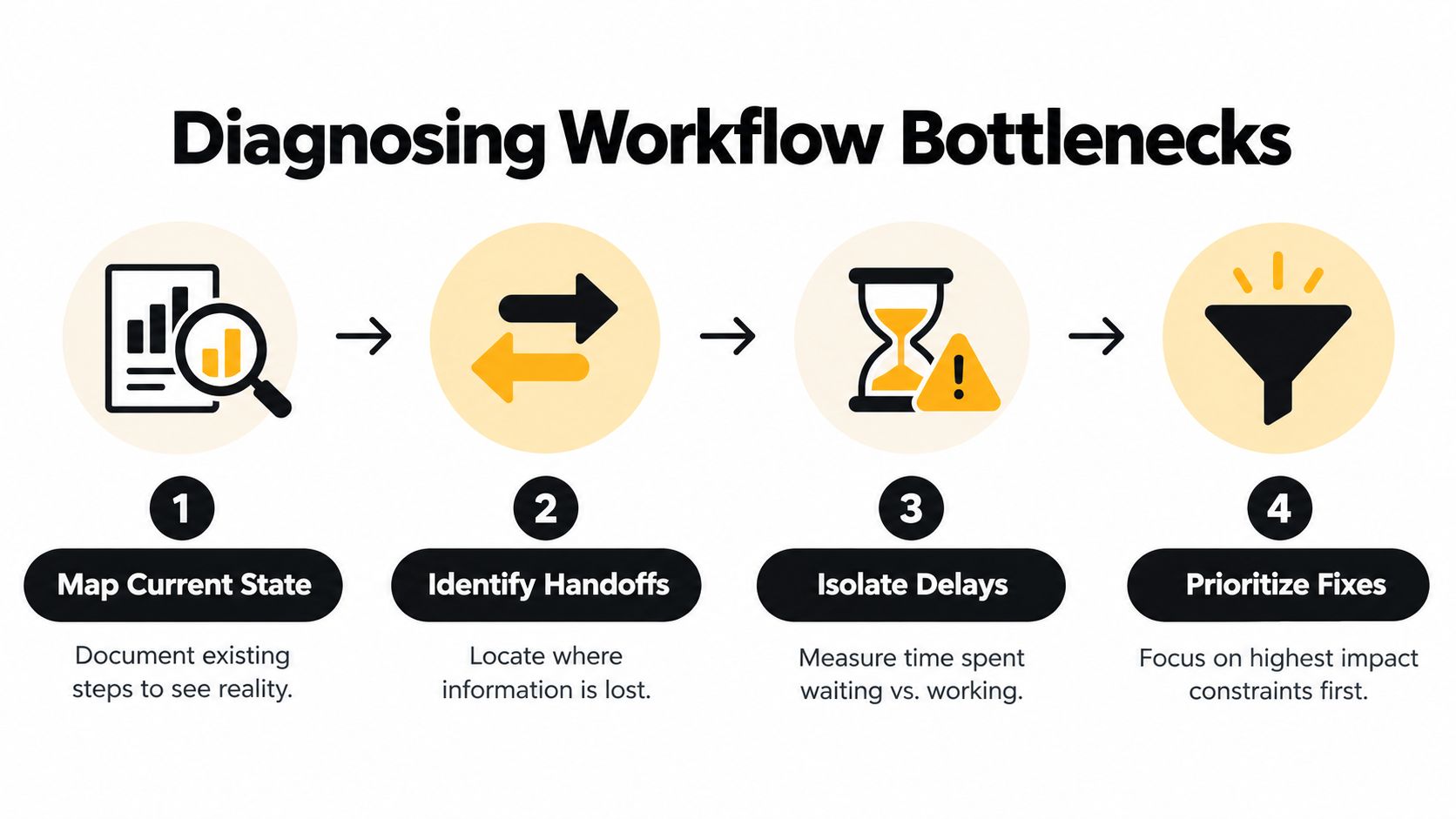
Map the work people actually perform
Use a simple worksheet with these columns:
- Process step: Describe the action in plain language, such as “sales confirms implementation requirements.”
- Owner: Name the role responsible, not just the department.
- Input: Record the information required before the step can begin.
- System: Note where the work and evidence live.
- Wait condition: Capture what causes the next person to pause.
- Output: Define what the next owner receives.
- Failure mode: Record missing fields, duplicate work, rework, or escalation.
Then classify each problem. Productivity bottlenecks consume excessive effort. Quality bottlenecks create errors, inconsistent delivery, or rework. Cost bottlenecks use expensive specialist time for routine coordination or create avoidable operational spend.
This classification prevents a common mistake. A team may try to reduce cycle time when the core issue is quality. That can push defective work downstream, where fixing it costs more and affects customers. Another team may hire before checking whether a single ambiguous approval is creating the apparent capacity shortage.
The benchmarking sequence from manufacturing operational benchmarking guidance is useful even for SaaS. Define the KPI set, standardize the definitions, map each process and handoff, measure cycle time and quality, and test scenarios before rollout. The source reports 75% to 85% OEE for global manufacturing leaders and 45% to 60% for many emerging-market plants, but the more transferable lesson is the method, not the manufacturing comparison.
Separate working time from waiting time
For each step, ask whether the owner is actively working or waiting for information, access, approval, or a response. Waiting often hides between teams, where no single person feels responsible for the delay.
Look for signals such as:
- Repeated entry: Someone copies account, billing, or product data between systems.
- Unclear decision rights: Several people review a request, but nobody knows who can approve it.
- Exception dependence: The standard process works only when every request is identical.
- Invisible queues: Work sits in an inbox, channel, or personal task list without an agreed service expectation.
- Unowned corrections: A downstream team fixes upstream data but doesn't report the original defect.
For revenue teams, structured analysis can help reveal whether a change in recurring revenue comes from churn, contraction, failed payment, downgrades, or a handoff problem. A library of prompts for recurring revenue analysis can support that investigation, provided the underlying data definitions are consistent.
Finally, estimate the cost of the bottleneck without pretending to precision you don't have. Count repeated tasks, rework instances, delayed decisions, and people involved. A meeting cost calculator can make coordination overhead visible, but the more important output is a ranked list of constraints. Fix the handoff that affects customers, cash, or scarce specialist capacity first.
Setting KPIs That Actually Guide Decisions
A KPI should tell someone what to do next. If a metric merely reports activity, it may be useful for context, but it won't guide operational efficiency improvement.
Start with a small set that covers productivity, quality, and cost. Then separate leading indicators from lagging indicators. A leading indicator warns that a process is drifting, such as incomplete onboarding data or an expanding queue of unassigned tickets. A lagging indicator confirms the result, such as churn, rework, or missed implementation commitments.
The mistake is not choosing the wrong metric in isolation. It's allowing different teams to use the same word for different measurements.
Build a shared measurement language
Define each KPI in a short operating note:
- Name: Use a specific label rather than “efficiency.”
- Formula: State what is included and excluded.
- Owner: Assign one person who can explain changes.
- Cadence: Decide how often the team reviews it.
- Decision threshold: Describe what triggers investigation or action.
- Source of truth: Identify the system and field definitions.
- Known limitations: Record missing data or potential bias.
For example, “onboarding time” might start at contract signature or at the first customer meeting. It might end at technical setup, user activation, or the customer's first successful outcome. Those are different KPIs. Pick one, document it, and don't compare teams until they use the same definition.
The following hierarchy keeps the dashboard connected to decisions:
| Metric Category | Focus Area | Primary Indicator Example |
|---|---|---|
| Productivity | Work completed with available capacity | Completed implementation tasks per owner |
| Quality | Accuracy and rework | Percentage of handoffs accepted without correction |
| Cost | Resource consumption | Specialist hours spent per completed workflow |
| Flow | Movement through the process | Time waiting between ownership changes |
| Outcome | Customer or business result | Successful activation after onboarding |
Teams that need a broader starting list can review indicatori per reparto operations and adapt the categories to their own operating model. The goal isn't to fill a dashboard. It's to create a stable measurement system that exposes the next constraint.
Don't benchmark against a moving target
Benchmarking becomes misleading when teams change definitions during an improvement project or compare a mature process with an early one. It also fails when leaders use a new target every week, making progress impossible to interpret.
Choose a stable peer group or internal baseline. Compare like with like. If you change the workflow, annotate the change so a later improvement isn't confused with a reporting change.
A cohort view is especially helpful when a total average conceals different customer or product behavior. Use cohort analysis to compare groups that started under similar conditions, then connect the result to the operational steps those groups experienced.
A useful KPI doesn't just show that performance changed. It points to the owner, process step, or data definition that needs attention.
Review leading indicators frequently enough to intervene, but don't turn every fluctuation into a project. Use lagging indicators to test whether the intervention created a durable business result. If the numbers disagree, investigate the data before blaming the team.
Choosing Between Process Fixes and Tooling
The decision isn't “manual work or automation.” The choice is whether the process is ready for automation and whether the software solves a capability gap that process discipline can't address.
Process redesign usually wins when the workflow contains duplicate approvals, unnecessary fields, unclear ownership, or inconsistent rules. New software becomes more reasonable when a good process already exists but the team can't execute it reliably at the required volume, speed, or level of traceability.
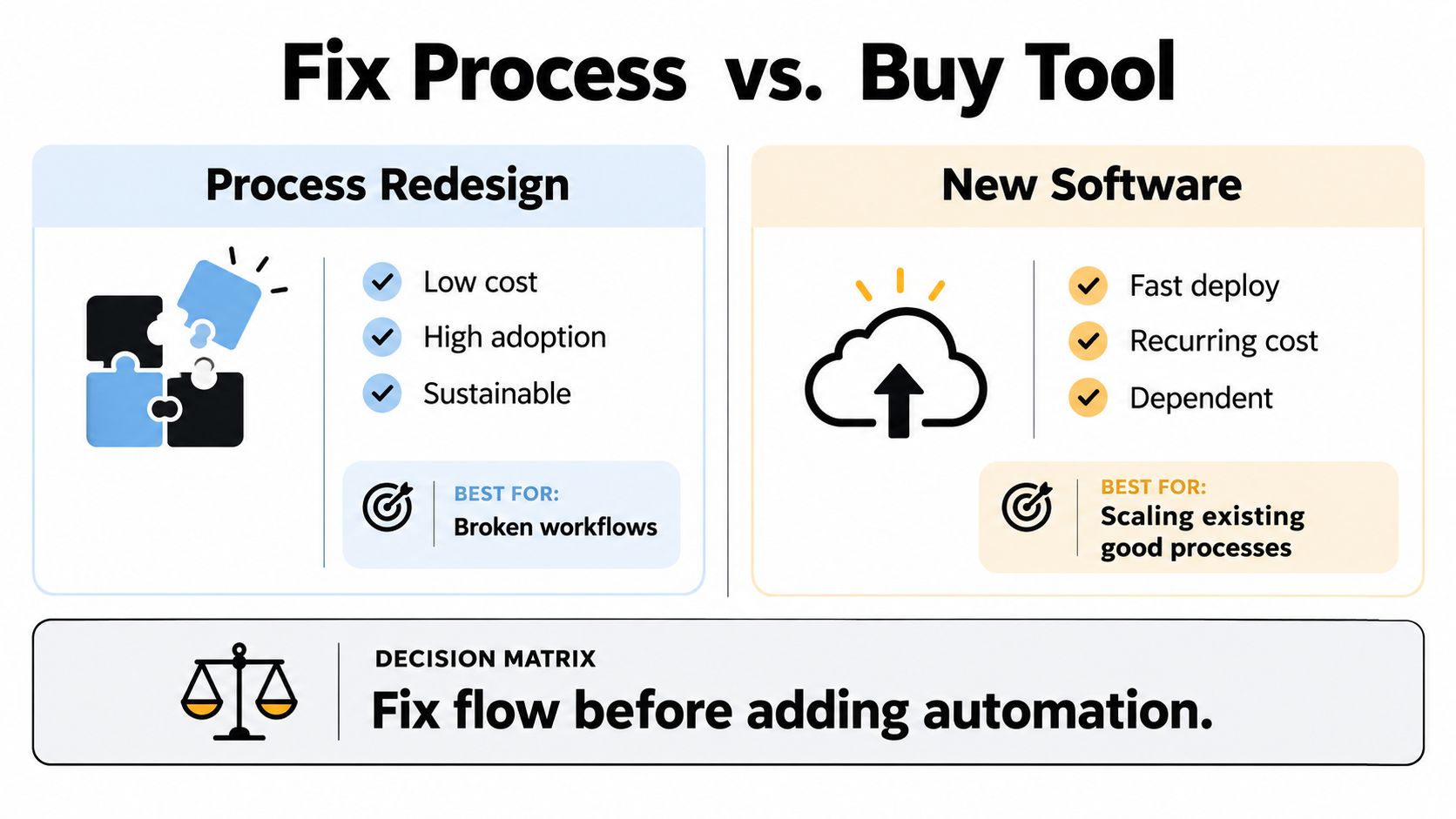
Fix the flow when the logic is broken
Choose process redesign first when:
- People enter the same information repeatedly: Remove the duplicate requirement and establish a source of truth.
- Approvals exist for historical reasons: Test whether the approval protects quality, compliance, or merely tradition.
- Exceptions dominate the workflow: Simplify the offer, policy, or intake form before building complex routing.
- Nobody owns the outcome: Assign decision rights before configuring notifications.
- The data is unreliable: Define required fields and validation rules before syncing systems.
A small SaaS team can often solve these problems with a shared form, a clear operating document, and a scheduled review. That may feel simpler than buying a platform, but it reduces training overhead and gives the team a process worth scaling.
Buy capability when the process is stable
Software earns its place when it provides something the current stack can't do without fragile workarounds. Examples include dependable audit trails, permission controls, high-volume event processing, reliable reporting, or integrations that would take disproportionate engineering time to maintain.
Before signing a contract, test the data path rather than the demo. Can the system accept your real records? Does it preserve ownership and timestamps? What happens when a field is missing? Can a person correct an exception without bypassing the process? Who maintains the integration after the original builder leaves?
For administrative work that doesn't justify a full-time hire, founders can also compare external capacity with software. A guide to best places to hire remote legal assistants is relevant when a human review, document check, or recurring coordination task needs accountable support rather than another automated trigger.
Use AI workflow automation tools only after you can state the workflow's inputs, outputs, exceptions, and owner. AI can classify, summarize, route, and draft. It can't decide whether your team has defined the right customer status or whether the approval should exist.
Buying test: If you can't explain the process on one page, you're not ready to automate it on a platform.
This is also where discovery matters. SubmitMySaas lets founders list a SaaS product for launch visibility, trending placement, and monthly roundups, with product features, pricing, categories, and social links presented for evaluation. It can be one channel for finding tools, but discovery shouldn't replace a disciplined capability assessment.
Avoiding the Implementation and Sustainment Trap
A process can work during a launch project and fail three months later. The difference is rarely the quality of the first workshop. It's whether the team has ownership, training, feedback, and a mechanism for correcting drift.
The failure risk is substantial when leaders define success as reaching the original ambition rather than achieving and sustaining partial gains. A synthesis of transformation research reports roughly 31% success in McKinsey-style research, 25% to 30% in BCG analyses, and 12% of more than 24,000 Bain initiatives reaching their original ambitions. The figures come from analysis of process-improvement failure, which also distinguishes original-target success from any improvement.
That distinction matters for a cash-strapped startup. A project can create a real improvement and still miss an overconfident target. Treating that as total failure encourages teams to abandon useful changes, while declaring victory too early hides weak adoption.
Give the new process a named owner
An executive sponsor should remove obstacles and protect the initiative from competing priorities. An operational owner should maintain the workflow, answer questions, review exceptions, and propose changes. Those roles can belong to the same person in a small company, but they shouldn't be invisible.
Common failure modes include resistance to cultural change, weak leadership support, inadequate training, poor communication, and insufficient resources. Each requires a different response:
- Resistance: Involve the people doing the work before finalizing the design, and show which frustration the change removes.
- Weak sponsorship: Give one leader authority to settle conflicts and allocate time.
- Poor training: Teach the workflow through real scenarios, including exceptions.
- Weak communication: Explain the KPI definitions and why the process changed.
- Limited resources: Narrow the rollout to the highest-value path instead of promising a company-wide transformation.
A board such as Asana Kanban boards can make ownership and queue status visible, but visibility alone doesn't create accountability. Each card needs a clear definition of ready, a responsible owner, and a rule for escalation.
Design for reinforcement
Write the new process into onboarding, team check-ins, and manager reviews. Add validation where errors are expensive, not everywhere. Review exceptions separately from normal work because exceptions reveal where the design needs refinement.
The same failure analysis reports that defining success as any improvement can reduce the apparent failure rate to 5% to 10%, while durable three-year sustainment remains rare without explicit reinforcement mechanisms. The practical takeaway is not to lower the bar. It's to measure three things separately: initial improvement, adoption, and persistence.
A monthly audit can check whether the source of truth is still accurate, whether people are bypassing required fields, and whether the KPI still supports a useful decision. If the process depends on one heroic operator, it isn't efficient yet. It's merely being rescued.
Building a Continuous Improvement Loop
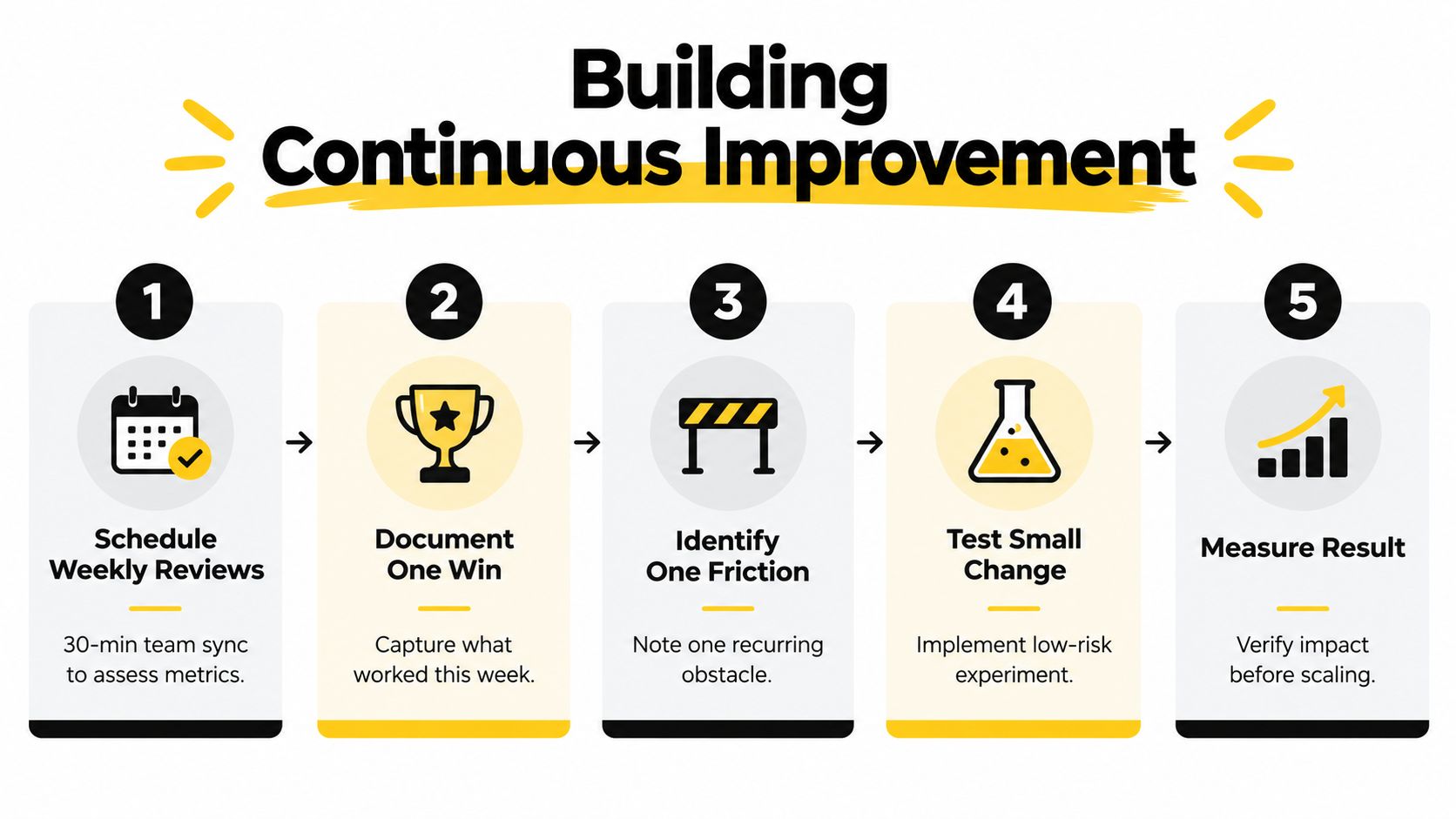
Operational efficiency improvement becomes durable when the team treats every change as an experiment with a feedback path. The loop is simple: observe the workflow, define the measure, change one constraint, check the result, and update the operating standard.
That cycle prevents two expensive habits. The first is launching a large transformation without understanding the current state. The second is fixing one bottleneck, then assuming the whole system is healthy.
Make the review small enough to survive
A weekly review doesn't need a presentation. The owner brings the agreed KPIs, one completed improvement, one recurring friction, and one proposed experiment. The team decides whether to test, standardize, investigate, or stop.
Use a short operating rhythm:
- Review the signal: Check the leading indicators and any material outcome changes.
- Name the constraint: Identify the specific step, handoff, or data issue creating friction.
- Choose one change: Prefer a reversible adjustment with a clear owner.
- Record the expectation: State what should change and which KPI will show it.
- Inspect the result: Keep, revise, or remove the change based on evidence.
- Update the standard: Change the documentation, form, automation, or training material.
Documenting one win matters because teams otherwise forget which change produced the improvement. Recording one friction matters because repeated complaints become visible patterns instead of isolated annoyance.
Let the data feed the next diagnosis
The loop should connect directly to the workflow map. If a KPI worsens, return to the relevant handoff and observe the work again. Don't immediately add a notification or assign blame. The process may have changed, the data may be incomplete, or a new exception may have become common.
The next tool decision should also come from the loop. If the team repeatedly follows a stable process but spends time on mechanical transcription, automate that step. If the process keeps changing because the offer, ownership, or policy is unclear, redesign it first.
The operating system of a startup isn't its software stack. It's the set of decisions the team can make consistently without the founder stepping in.
Start with one workflow that touches customers, cash, or scarce expertise. Map it, standardize its KPIs, fix the highest-friction handoff, and review the result until the new behavior becomes ordinary. That's how a founder replaces chaos with a system that can keep improving.
SubmitMySaas gives SaaS founders a practical place to submit products for daily launch visibility, trending placement, and monthly roundups while helping users discover tools by category, features, and pricing. If you're ready to put a useful product in front of an audience after tightening its operating foundations, visit SubmitMySaas and review the submission options.