How to Make a SaaS Launch Video That Converts
Learn how to plan, script, and produce a high-converting SaaS launch video. Discover practical frameworks, testing methods, and distribution tips for founders.
Video is no longer a nice-to-have for a SaaS launch. Wyzowl's 2025 research found that 89% of businesses use video for marketing, 95% of marketers consider it important to their strategy, and 93% report positive return on investment (HubSpot's summary of the research). The useful question isn't whether you need a video. It's whether your video can move a qualified visitor from recognition to action.
A launch video should earn its place in the funnel. That means showing the product quickly, making the problem concrete, and giving viewers one measurable next step. Cinematic polish can help, but it won't rescue a vague promise, a buried interface, or a CTA that asks visitors to do three things at once.
Why Video is Now a Baseline Requirement for SaaS
Static copy explains a product. Video demonstrates it. That difference matters for workflows, integrations, automation, dashboards, and interface changes that screenshots and paragraphs cannot fully communicate.
The same Wyzowl research reports that 99% of video marketers say video helps users understand a product or service, while 96% say it increases brand awareness and 84% say it helps drive sales. These figures do not guarantee conversions. They do explain why video has become a standard product marketing asset rather than an experimental extra.
A SaaS launch video can support several jobs at once:
- Product education: Show what the user does, not merely what the platform includes.
- Use-case clarification: Connect a visible interface to a specific business problem.
- Credibility building: Replace broad promises with observable product behavior and evidence.
- Content reuse: Adapt the core asset for a launch page, social clips, sales outreach, and discovery listings.
SaaS has always been sold through demonstration
The cloud software model depends on access, usability, and recurring value. Salesforce was founded on March 8, 1999, with the premise that customers could access business software over the internet and pay through a subscription model. Its public service launch followed on February 7, 2000, initially with 200 customers, according to Salesforce's company history.
That history supports a practical point for launch videos: cloud software is easier to evaluate when people can see the experience. A video should make the route from problem to outcome tangible, rather than repeat a corporate mission statement over polished visuals.
Treat the launch video as a measurable conversion experiment. Test its placement on the launch page, compare performance against a version without video, and judge the asset by what qualified visitors do next. A strong opening can improve understanding, but the video still needs a clear conversion path and a visible product demonstration.
Practical rule: Build the launch video as a compact product demonstration with a conversion job, not as a trailer for the brand.
A founder who begins with an abstract mission statement asks viewers to supply the missing context. A product marketer who begins with the user's problem removes that burden. The strongest asset helps visitors understand the product quickly, then gives them a clear reason to continue through the funnel.
Scripting the Shortest Path to the Aha Moment
The script should answer one question: what must the viewer understand or do next? If the answer includes starting a trial, sharing the launch, joining a newsletter, booking a call, and submitting feedback, the video has too many jobs.
Choose one conversion goal first. For a product-discovery launch, that might be “Start a free trial” or “Submit your product.” Tie every scene to that action, then remove anything that doesn't help the viewer reach it.
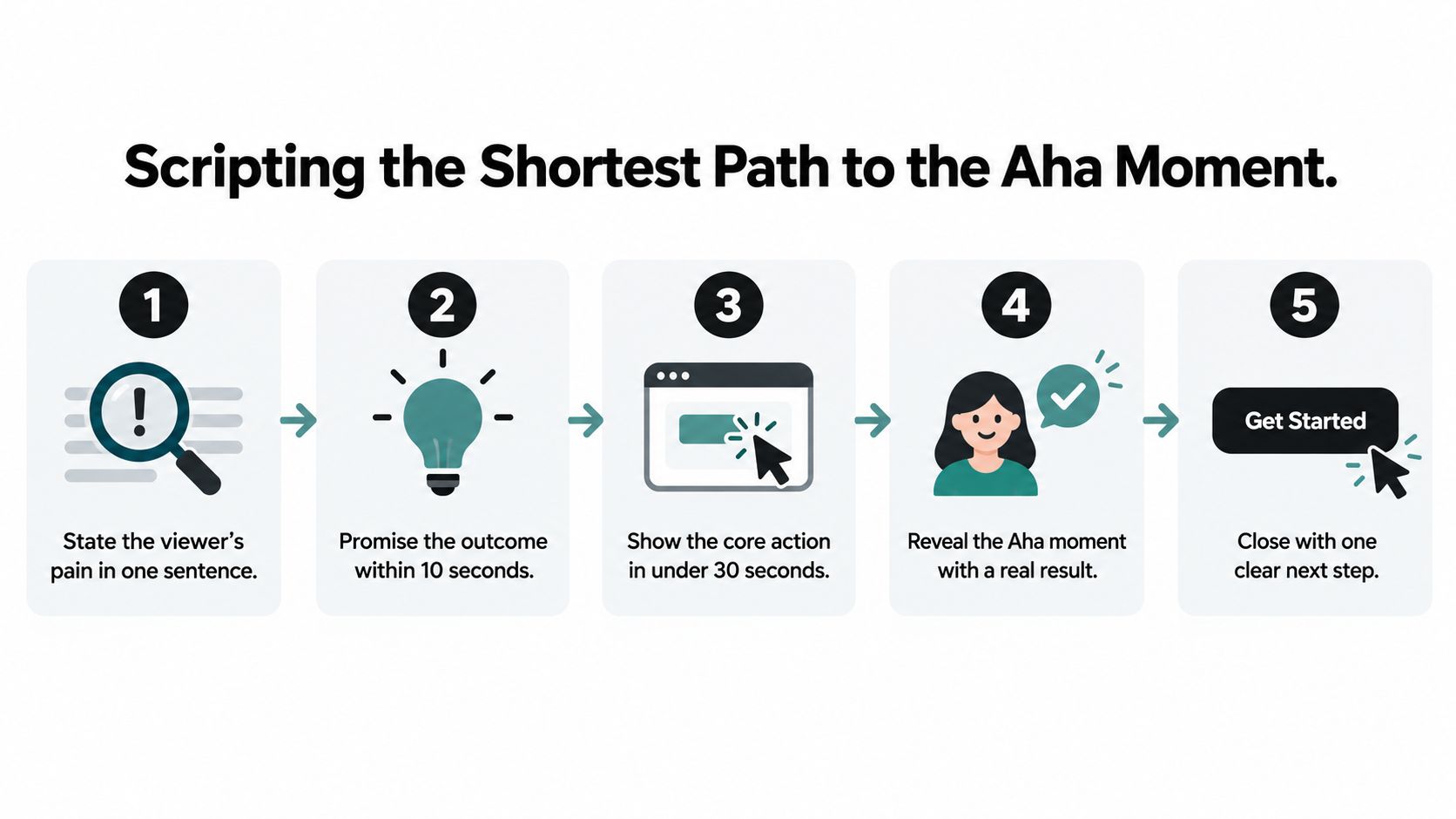
Build the narrative around five decisions
State the pain immediately. Use the first 3 to 5 seconds to name the problem in language your target user recognizes. “Your team loses requests across five disconnected tools” is more useful than “Meet the future of collaboration.”
Promise the outcome. Tell viewers what changes if they keep watching. The promise should be specific enough to create direction, but honest enough to support with the product.
Show the shortest route to value. Skip account settings, secondary features, and decorative transitions. Show the action that produces the product's “aha” moment, whether that's turning a brief into a campaign, connecting an integration, or surfacing a decision-ready report.
Use proof instead of feature accumulation. A quantified outcome, customer evidence, or visible before-and-after workflow carries more weight than a rapid list of capabilities. If you don't have defensible performance data, show the product clearly and avoid unsupported claims.
Close with one CTA. Repeat the action visually and verbally. The viewer shouldn't have to decide whether to visit your homepage, find a pricing page, or search for the signup button.
A useful storyboard is simple: problem, promised change, core action, result, CTA. Draft the voiceover and on-screen text separately, because viewers may watch with sound off. Then cut every line that doesn't improve comprehension or intent.
For a deeper treatment of hooks, pacing, and action-oriented structure, study this direct-response YouTube ad strategy from Wojo Media. The principles transfer well to SaaS launch videos, especially when cold traffic arrives with little context.
You can also use this product demo video guide to map the demonstration around a real user workflow rather than a feature inventory. The launch video should leave the viewer with one clear belief: this product solves my problem, and I know what to do next.
Choosing the Right Production Format and Tools
A high production budget does not guarantee a high-converting SaaS launch video. Overproduction can delay release, obscure the interface, and turn a conversion test into a branding exercise. Choose the format according to the belief you need to create, then judge it by signups and qualified actions rather than visual polish.
If the interface is intuitive, record it. If the value proposition is abstract, animation can make the workflow visible. If trust in the founder or team is the main barrier, add live action, while keeping product evidence in the frame.
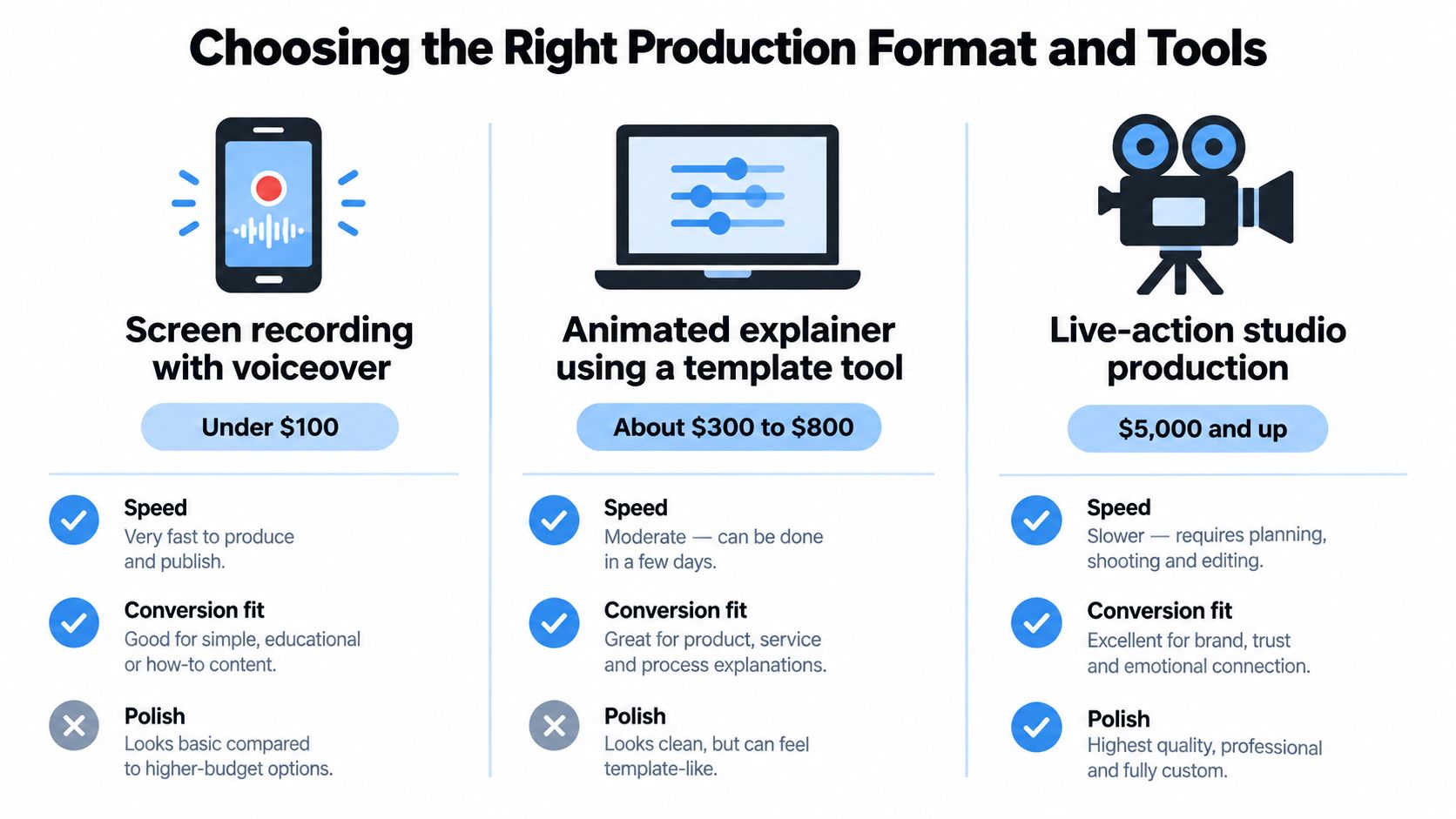
Compare formats by conversion job
| Format | Best use | Main risk |
|---|---|---|
| Screen recording with voiceover | Clear interfaces and workflow-led demos | Poor cursor control, unreadable UI, or weak narration |
| Template-based animated explainer | Abstract systems, automation, integrations, and early concepts | Generic visuals that do not prove the product works |
| Live-action studio production | Trust, category positioning, and brand-led launches | High effort that can overshadow the product |
Foundry CRO's 2026 landing page video benchmarks report reports that talking-head videos reduced conversion by 11% on average, while demos under two minutes produced a 27% lift. Treat both figures as directional. Audience temperature, page context, offer, and execution can change the outcome.
For an early SaaS launch, start with a crisp screen recording and deliberate narration. Record at a generous resolution, enlarge important interface states, slow cursor movement, and remove loading delays during editing. Use a real microphone or a quiet setup. Muddy audio can make a well-designed product feel unreliable.
An animated explainer fits products that do not yet have a meaningful interface to show. Tie every visual to a specific workflow. Abstract shapes may look polished, but they rarely answer practical questions about setup, usage, or outcome.
Teams running fast creative tests can use tools such as ClipNova's AI video creator for early drafts, variations, and social cutdowns. Generated footage should support production, not replace product truth. Check the final asset for accurate UI, credible claims, readable captions, and a CTA connected to the launch action.
Use this video editing software comparison when choosing an editing workflow. The tool matters less than producing a version you can publish, measure, and improve. A plain, accurate demo that earns action beats a cinematic video that only earns compliments.
Optimizing Landing Page Placement and Testing
A landing-page video is a conversion experiment, not a decorative asset. Its position, loading behavior, poster frame, surrounding copy, and interaction model determine whether visitors watch, understand the offer, and act.
Start with a clean comparison. Keep the traffic source, offer, headline, supporting copy, and CTA consistent. Randomly assign visitors to a no-video control, an inline player, or a click-to-open lightbox. Judge the variants by completed signups or qualified submissions, not by play counts.
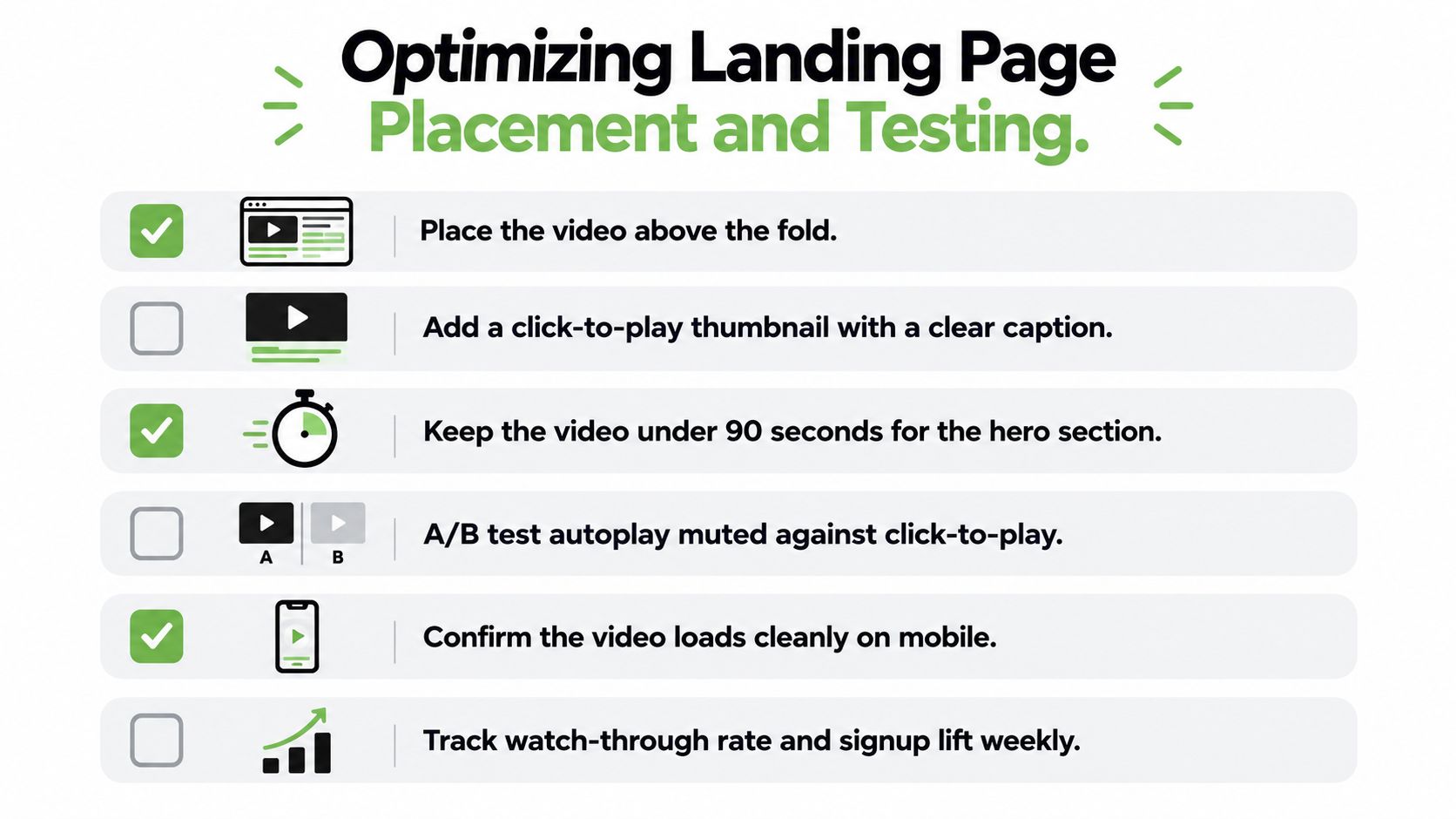
Design the page around the decision
The poster frame carries part of the sales message. Select a frame showing the product outcome, a meaningful interface state, or a short caption explaining why the video deserves attention. A random frame from the middle of a recording rarely gives visitors enough context.
Lazy-load the player so it does not compete with the primary content during the initial load. Avoid autoplay with sound. On mobile, check that the thumbnail, controls, captions, and CTA remain usable without pinching or rotating the screen.
Placement needs testing because visitor intent differs by page and traffic source. A lightbox can keep the page focused while giving interested visitors a larger viewing experience. An inline player may provide context earlier, but it can also push the offer and CTA lower on the page. Treat both as hypotheses rather than defaults.
Don't ask whether video converts better in general. Ask which presentation produces more qualified activation for this audience and offer.
Your test report should include absolute conversion rates, sample size, confidence intervals, and downstream quality. A variant that generates more signups but fewer activated users may weaken the funnel while appearing successful at the surface.
Use this landing page optimization guide to test the page beyond the player itself. Change one major variable at a time, such as placement, opening claim, poster frame, or CTA wording. Retest when the traffic mix changes, especially after a launch brings in unusually cold visitors.
Keep the video near the decision it supports. If the CTA sits far below the player, visitors can understand the product and still lose the path to action. Place the button beside the player, inside the lightbox experience, or immediately below the supporting proof.
Measuring Funnel Metrics Beyond Vanity Views
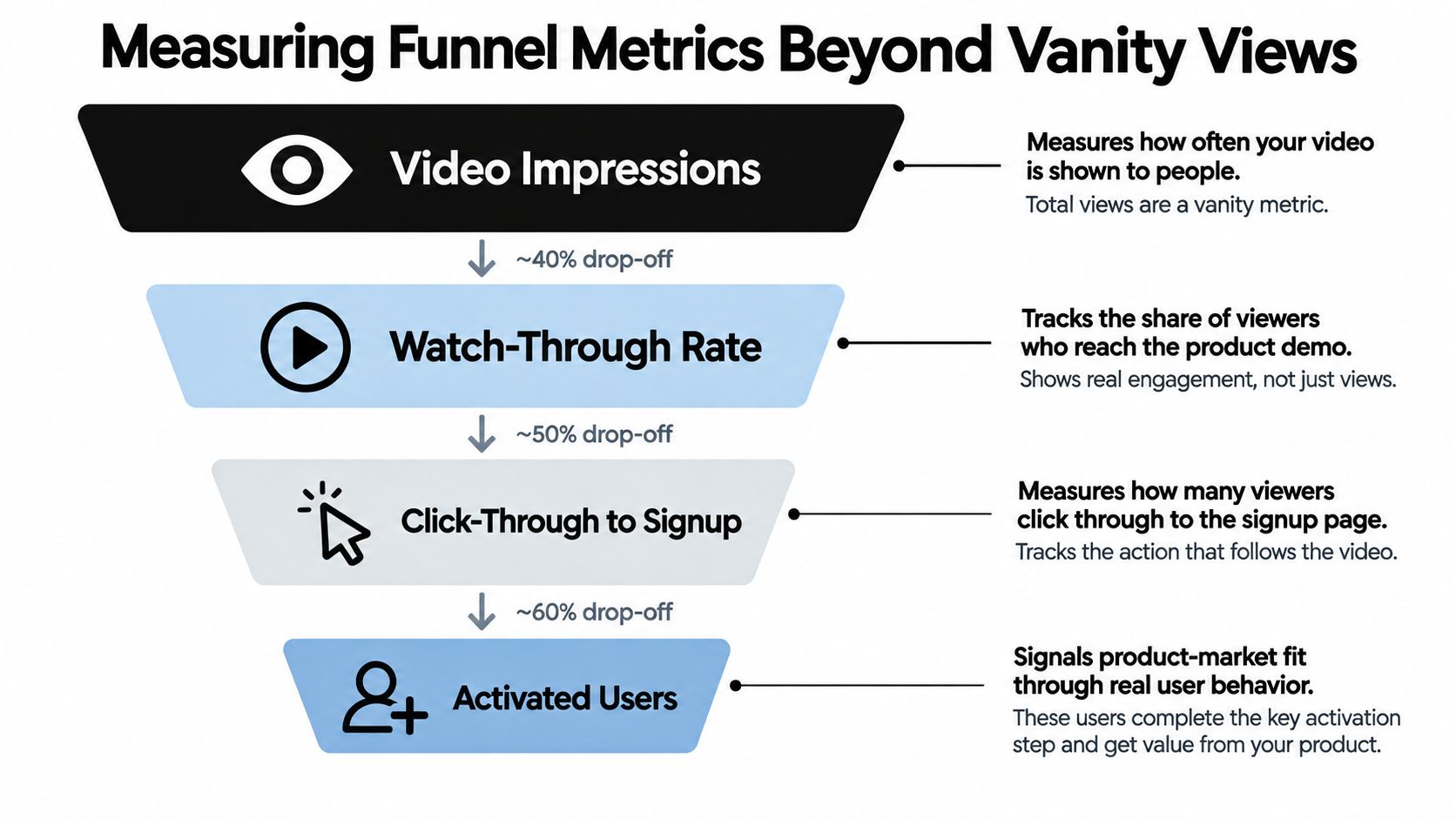
A high view count can still produce a weak launch. Viewers may watch the opening, skip the product explanation, and leave without signing up. Measure the path from exposure to meaningful product behavior.
Track the funnel in sequence:
- Thumbnail play rate: The share of exposed visitors who start the video.
- First-10-second retention: Whether the opening problem holds attention.
- Completion rate: The share reaching the proof and CTA.
- CTA click-through rate: Whether the message prompts the intended next action.
- Signup rate: Whether the page turns interest into an account or submission.
- Activated-user rate: Whether new users complete the behavior that signals meaningful product use.
Establish a control before optimizing
Build a text-only or image-led control page before making the video the default. Keep the offer and audience stable, then compare the video experience with that baseline. This separates incremental conversion value from attention generated by visitors who would have converted anyway.
Change one major variable per experiment. Test the opening claim, placement, duration, poster frame, or CTA wording separately. A winning variant is useful, but knowing which change caused the result makes the next test more efficient.
A useful directional benchmark reports that videos under one minute average about 50% engagement, with engagement declining as duration increases (HubSpot's video engagement benchmarks). Treat that as a constraint, not a production rule. Each additional scene should earn its place by clarifying the problem, demonstrating the product, or supporting the next action.
A technology-marketing survey reports that 49% of tech marketers use video to explain complex products, while only 17% cite conversion-rate improvement as a goal. That gap reflects a common measurement failure. Teams track whether viewers watched, then neglect whether those viewers signed up, activated, or reached the intended product milestone.
For examples of how companies present outcomes, browse customer results. Use them to identify the type of proof your video could show, then support your own claims with actual customer or product evidence.
Measurement rule: Optimize for activated users, not applause. A video with fewer plays but stronger qualified product behavior is performing better.
Use this product launch metrics guide to connect video results with the wider launch funnel. The video is one measurable touchpoint, so judge it by the downstream behavior it produces.
Distributing Your Asset Across Launch Channels
Publish the primary cut on the launch page first, then adapt it for the contexts where people discover and evaluate products. A product-discovery listing can use the core video alongside a concise description, screenshots, and a direct link. Social channels need shorter openings, stronger visual framing, and captions because many viewers encounter the clip without sound.
Create a small distribution package from the same recording:
- Hero cut: The clearest version for visitors who need product context.
- Short social clips: Pull out one problem, workflow, or result per clip.
- Feature cutdowns: Show one capability without forcing the viewer through the full story.
- Sales version: Add the proof or workflow most relevant to a specific prospect segment.
- Transcript: Make the narrative searchable, skimmable, and usable by people who can't watch.
Accessibility is also a distribution advantage. Add accurate captions, enlarge interface elements for mobile viewing, and provide a transcript on the page. Don't rely on color alone to explain a UI state, and check that the video remains understandable when muted.
Use a consistent naming and tracking system across launch directories, social posts, email sequences, and sales links. That lets you compare not only total traffic, but also which source produces engaged viewers, signups, and activated users.
This content distribution channels guide can help you plan the supporting assets around the launch instead of uploading one video and hoping the algorithm supplies the audience. Distribution works best when every cut has a defined viewer, context, and next action.
SubmitMySaas gives SaaS founders a launch and discovery platform for featuring products in daily launches, trending lists, and curated roundups. Add your launch video alongside the product description and link, then visit SubmitMySaas to put the asset in front of people actively looking for new software.